If you want to turn a Raspberry Pi 5 into a faster desktop, home server, NAS, media server, or Docker host, adding an NVMe SSD is one of the best upgrades you can make.
The Raspberry Pi 5 exposes a PCIe interface that allows compatible HATs and adapter boards to connect an M.2 NVMe drive. The official Raspberry Pi M.2 HAT+ supports PCIe 2.0 with a peak transfer rate of 500 MB/s, while third-party boards offer features such as 2280 SSD support, dual NVMe drives, PoE, and different mounting configurations.
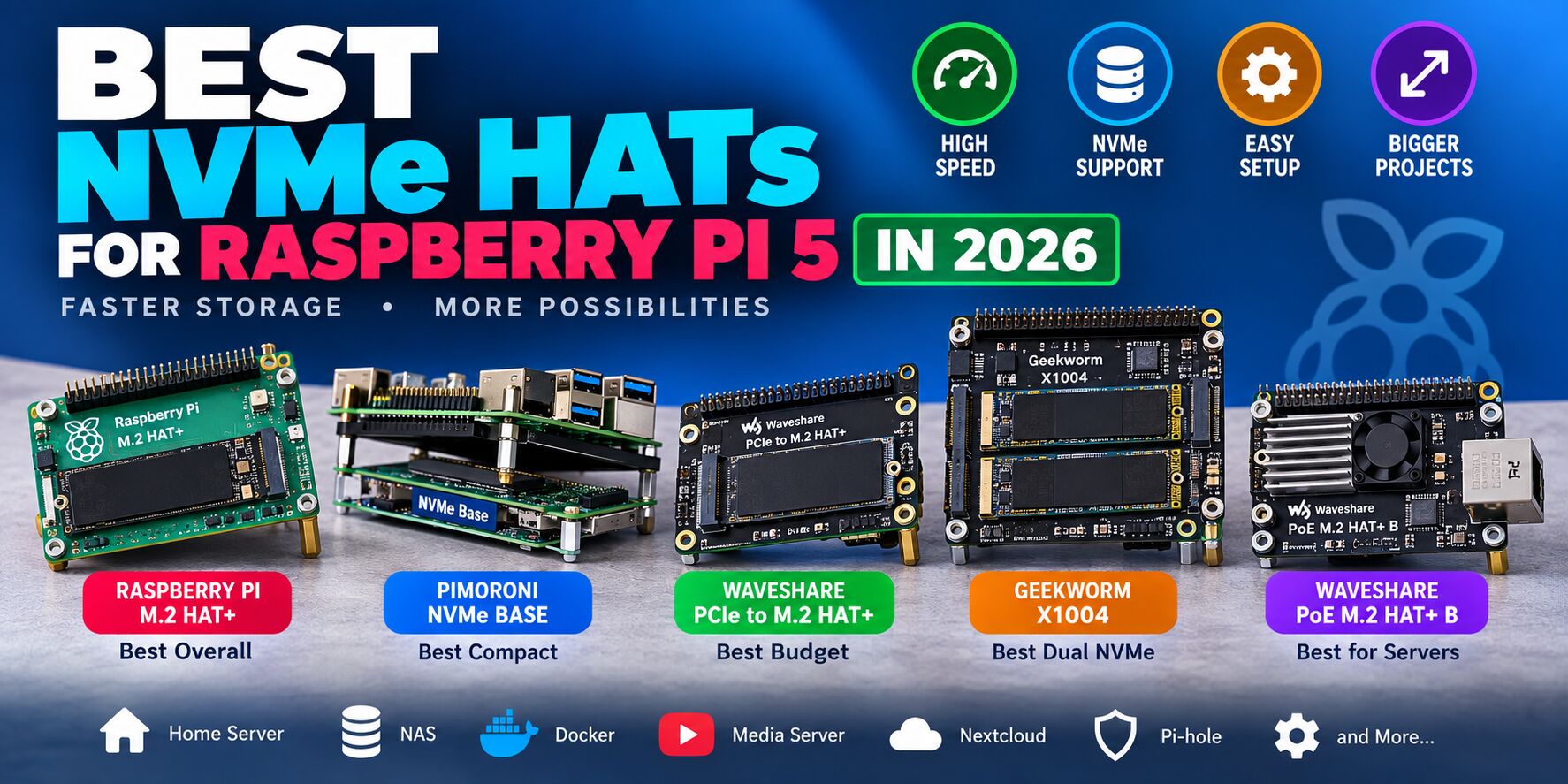
In this guide, we’ll look at the best NVMe HATs for Raspberry Pi 5 in 2026, including the best overall option, best budget HAT, best for 2280 SSDs, best dual-NVMe solution, and the best option for Raspberry Pi 5 servers.
Best NVMe HATs for Raspberry Pi 5
| NVMe HAT | Best For | SSD Sizes | PCIe | Key Feature |
|---|---|---|---|---|
| Raspberry Pi M.2 HAT+ | Best Overall | 2230/2242 | Gen 2 | Official Raspberry Pi solution |
| Pimoroni NVMe Base | Best Compact | 2230–2280 | Gen 2/3 capable | Under-Pi design |
| Waveshare PCIe to M.2 HAT+ | Best Budget | 2230/2242 | Gen 2/3 | Low-cost NVMe expansion |
| Geekworm X1004 | Best Dual NVMe | 2280 ×2 | Gen 2 | Two NVMe drives |
| Waveshare PoE M.2 HAT+ B | Best for Servers | 2230–2280 | Gen 2/3 | PoE + NVMe |
Our pick: The Raspberry Pi M.2 HAT+ is the easiest recommendation for most users. If you want a 2280 SSD, compact under-board mounting, dual drives, or PoE, one of the third-party alternatives may make more sense.
1. Raspberry Pi M.2 HAT+ — Best Overall
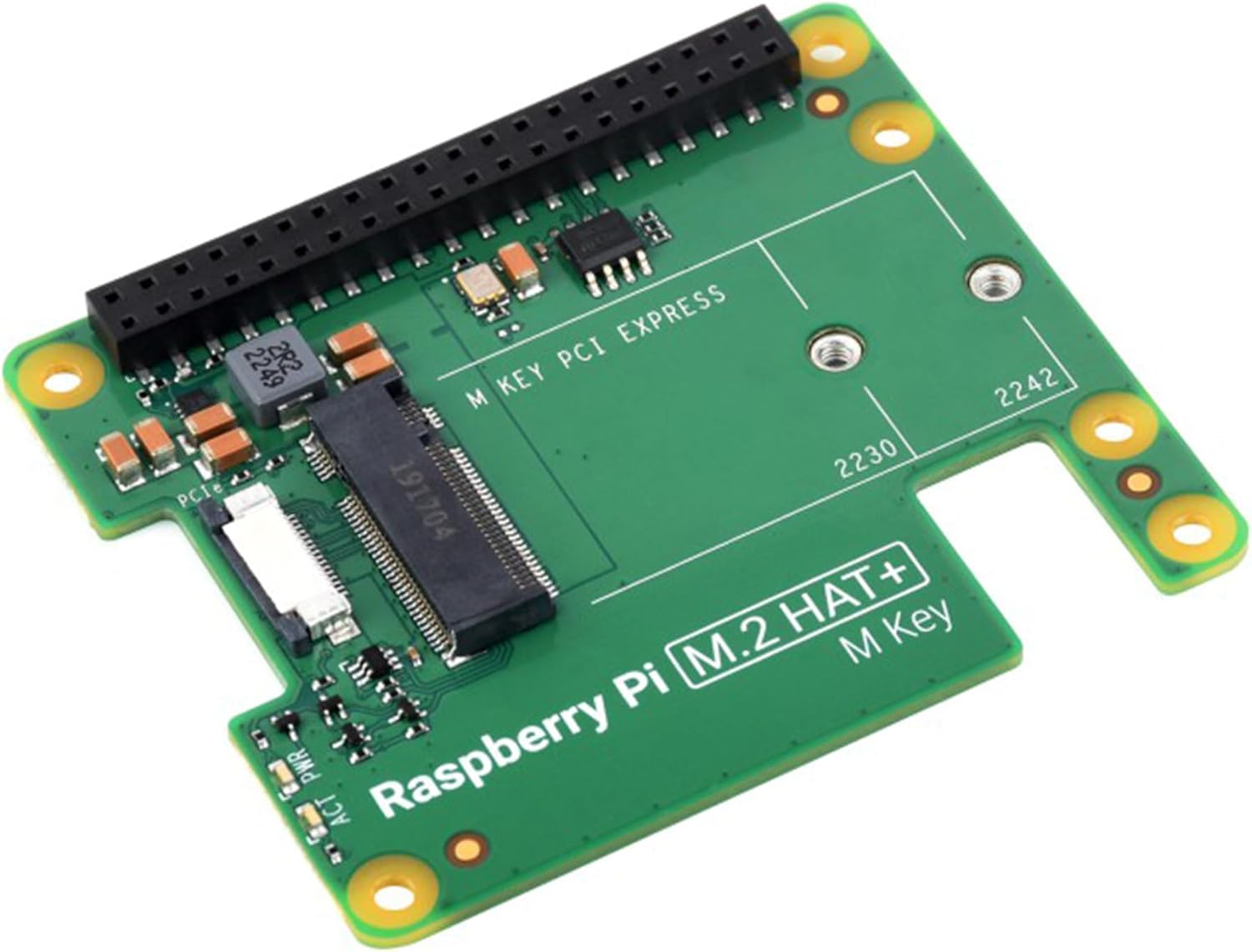
The official Raspberry Pi M.2 HAT+ is the best choice for users who want a straightforward, well-supported NVMe upgrade.
It connects an M.2 M-key device to the Raspberry Pi 5’s PCIe interface and supports 2230 and 2242 NVMe drives. It provides a single-lane PCIe 2.0 connection with a peak transfer rate of up to 500 MB/s.
The HAT+ also conforms to the Raspberry Pi HAT+ specification, allowing Raspberry Pi OS and firmware to automatically detect the board.
Key specifications
- Raspberry Pi 5 compatible
- M.2 M-key
- 2230 and 2242 SSD support
- PCIe 2.0
- Up to 500 MB/s peak interface bandwidth
- Up to 3A available for the connected M.2 device
- Power and activity LEDs
- Official Raspberry Pi design
- NVMe boot support
- Compatible with the Raspberry Pi Active Cooler
The standard HAT+ is designed to leave enough space for the Raspberry Pi Active Cooler underneath it.
Pros
- Official Raspberry Pi hardware
- Excellent compatibility
- Inexpensive
- Easy installation
- NVMe boot support
- HAT+ standard
- Long production lifetime
Cons
- Limited to 2230/2242 SSDs
- Not designed for full-size 2280 drives
- PCIe 2.0 limits maximum throughput
Best for
Most Raspberry Pi 5 users.
If you don’t need a special form factor or additional features, this is the NVMe HAT I’d recommend first.
2. Pimoroni NVMe Base — Best Compact Design
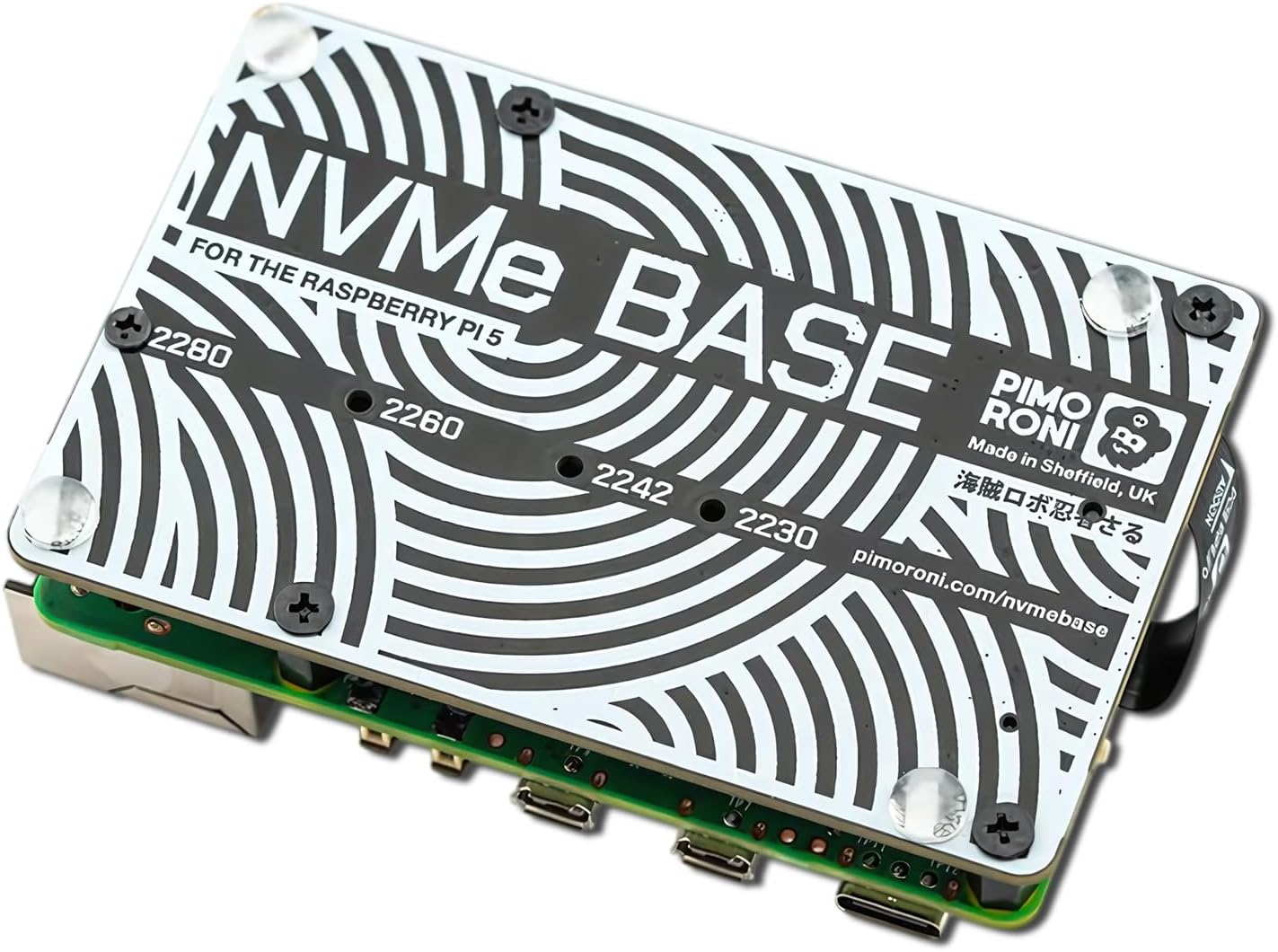
The Pimoroni NVMe Base takes a different approach. Instead of placing the SSD directly above the Raspberry Pi, the board mounts underneath the Pi.
It supports M-key NVMe SSDs ranging from 2230 through 2280, giving it considerably more flexibility than the official M.2 HAT+.
This makes it particularly attractive if you already own a standard 2280 NVMe SSD.
Key specifications
- Raspberry Pi 5
- M-key NVMe
- 2230, 2242, 2260 and 2280 support
- Under-board mounting
- Compact footprint
- Designed around Raspberry Pi’s PIP guidelines
- Suitable for servers, NAS applications and media centers
Pimoroni specifically positions the NVMe Base for applications such as file servers, media centers and reverse proxies where fast storage and high IOPS are useful.
Pros
- Supports common 2280 NVMe SSDs
- Very compact
- Excellent for home servers
- SSD is positioned underneath the Pi
- Clean desktop/server setup
Cons
- Doesn’t provide dual NVMe storage
- Requires careful attention to cooling and enclosure compatibility
- More specialized than the official HAT+
Best for
Raspberry Pi 5 home servers using a standard 2280 NVMe SSD.
This is particularly interesting for projects such as Docker, Nextcloud, Jellyfin, Pi-hole and other self-hosted applications.
3. Waveshare PCIe to M.2 HAT+ — Best Budget NVMe HAT
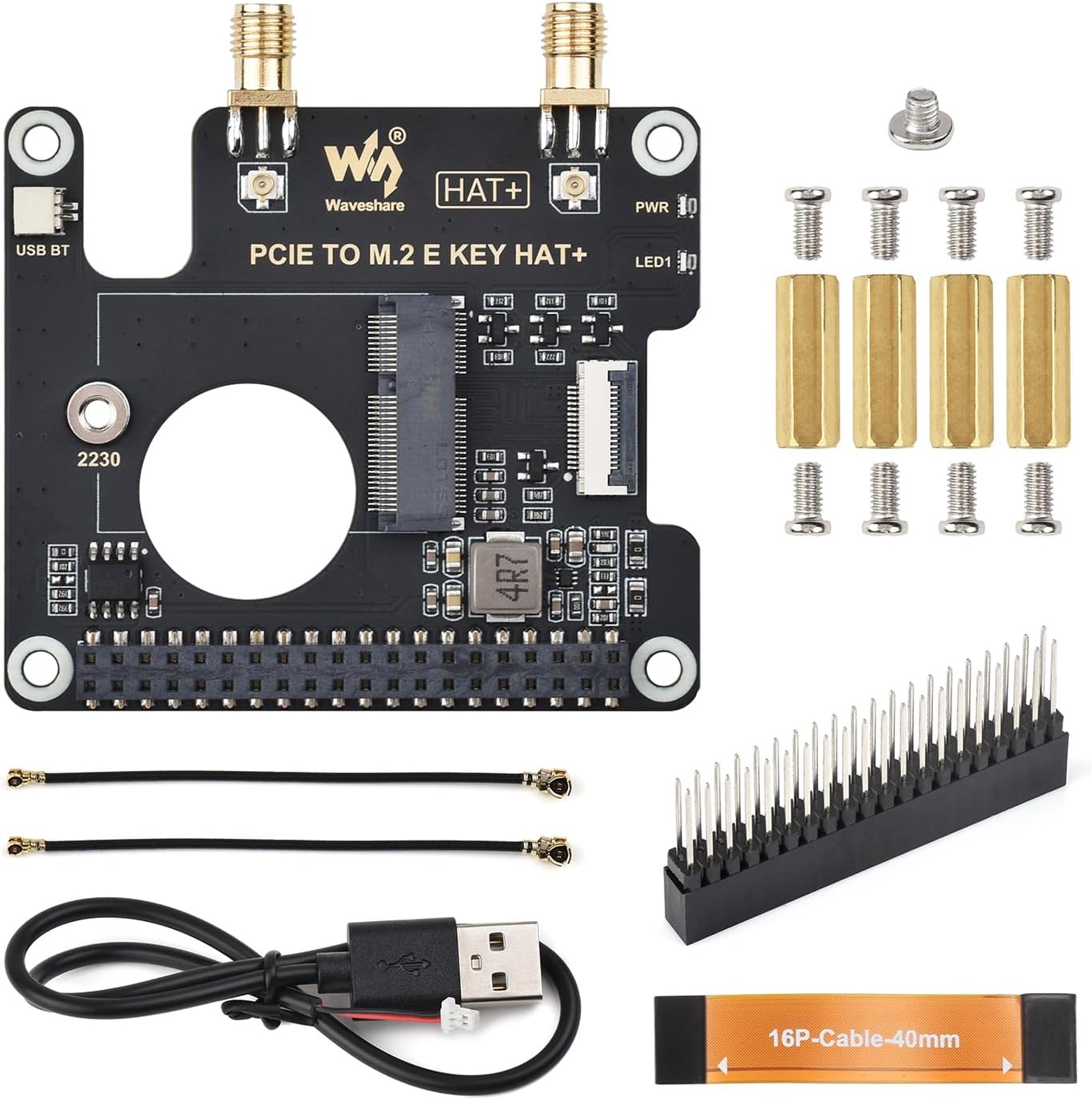
The Waveshare PCIe to M.2 HAT+ is an affordable alternative to the official Raspberry Pi HAT+.
It connects to the Raspberry Pi 5 through the 16-pin PCIe interface and supports 2230 and 2242 M.2 NVMe SSDs. Waveshare lists support for PCIe Gen 2 and Gen 3 modes and NVMe booting.
The board also includes a power-monitoring chip, EEPROM and dual status LEDs.
Key features
- Raspberry Pi 5 compatible
- M.2 M-key
- 2230/2242
- PCIe Gen 2/Gen 3 support
- NVMe boot
- Power monitoring
- EEPROM
- Dual LED indicators
- 40-pin GPIO header
Waveshare also offers versions bundled with 128GB and 256GB NVMe drives.
Pros
- Affordable
- Compact
- NVMe boot support
- Power monitoring
- Multiple kit options
Cons
- Limited to 2230/2242 drives
- Cable-based installation
- Less integrated than some server-oriented designs
Best for
Budget-conscious Raspberry Pi 5 owners.
It’s a good option when you want NVMe storage without spending much on the adapter itself.
4. Geekworm X1004 — Best Dual-NVMe HAT
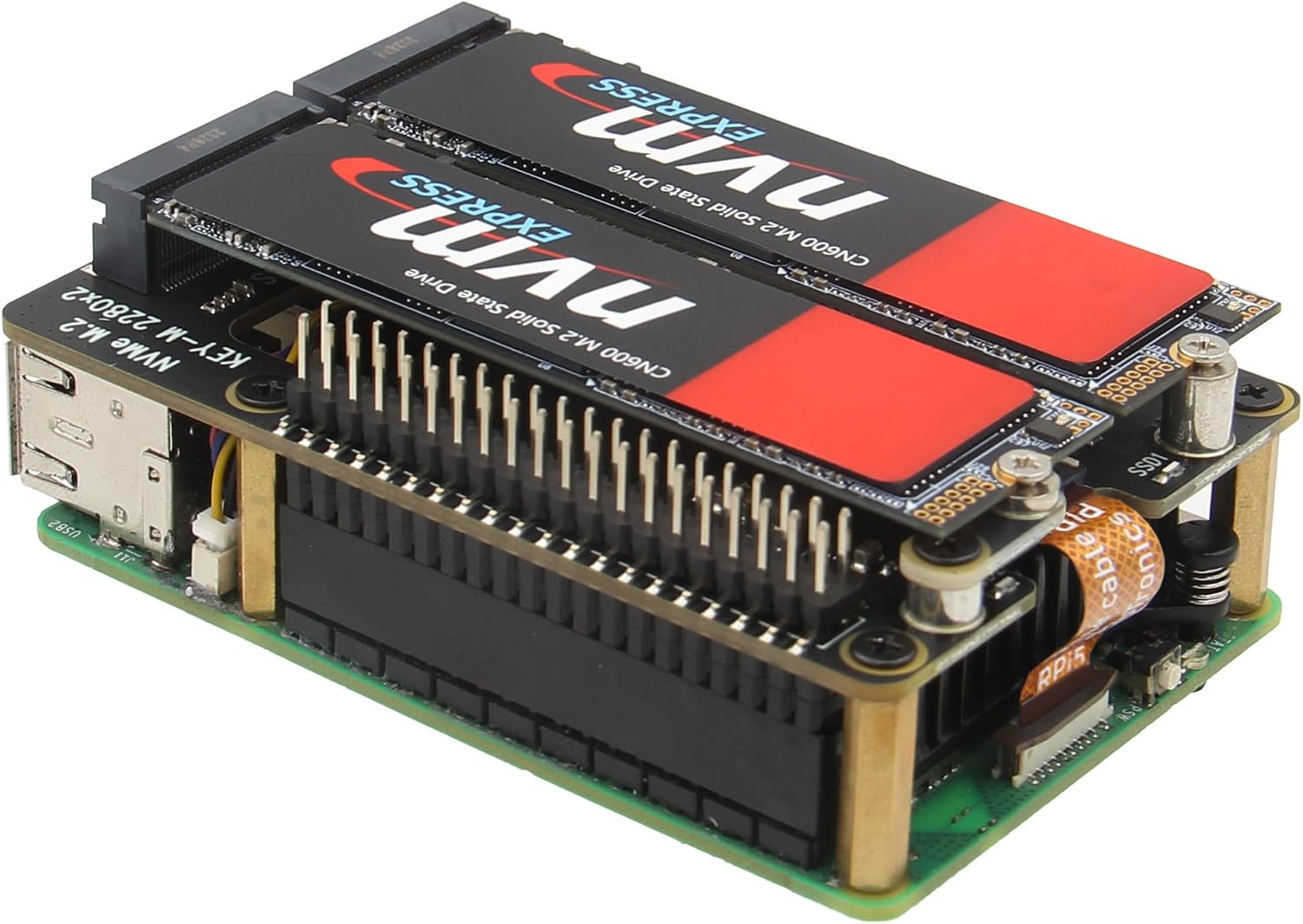
If one NVMe drive isn’t enough, the Geekworm X1004 is one of the more interesting options.
The X1004 supports two full-size 2280 NVMe SSDs, with a total advertised capacity of up to 8TB when using two 4TB drives.
It uses a PCIe switch to provide two NVMe connections while maintaining access to the Raspberry Pi’s GPIO header.
Key features
- Raspberry Pi 5 only
- Two M.2 2280 NVMe slots
- Up to 8TB total advertised capacity
- PCIe 2.0
- 40-pin GPIO access
- Drive activity LEDs
- Compatible with Raspberry Pi official passive cooling
- HAT-style mounting
- Supports HAT+ standby power state
One important limitation is that the ASMedia PCIe switch means the X1004 operates at PCIe 2.0 even if PCIe Gen 3 is enabled on the Raspberry Pi 5.
Pros
- Two NVMe drives
- 2280 support
- Excellent storage capacity
- Useful for NAS projects
- GPIO remains accessible
- Can be used alongside certain other HATs
Cons
- PCIe 2.0 limitation
- More expensive
- More complicated than a single-drive HAT
- Uses additional PCIe switching hardware
Best for
NAS and high-capacity Raspberry Pi 5 servers.
If you’re building a serious storage server rather than simply replacing your SD card, the X1004 is much more interesting than a basic single-drive adapter.
5. Waveshare PoE M.2 HAT+ B — Best for Raspberry Pi Servers
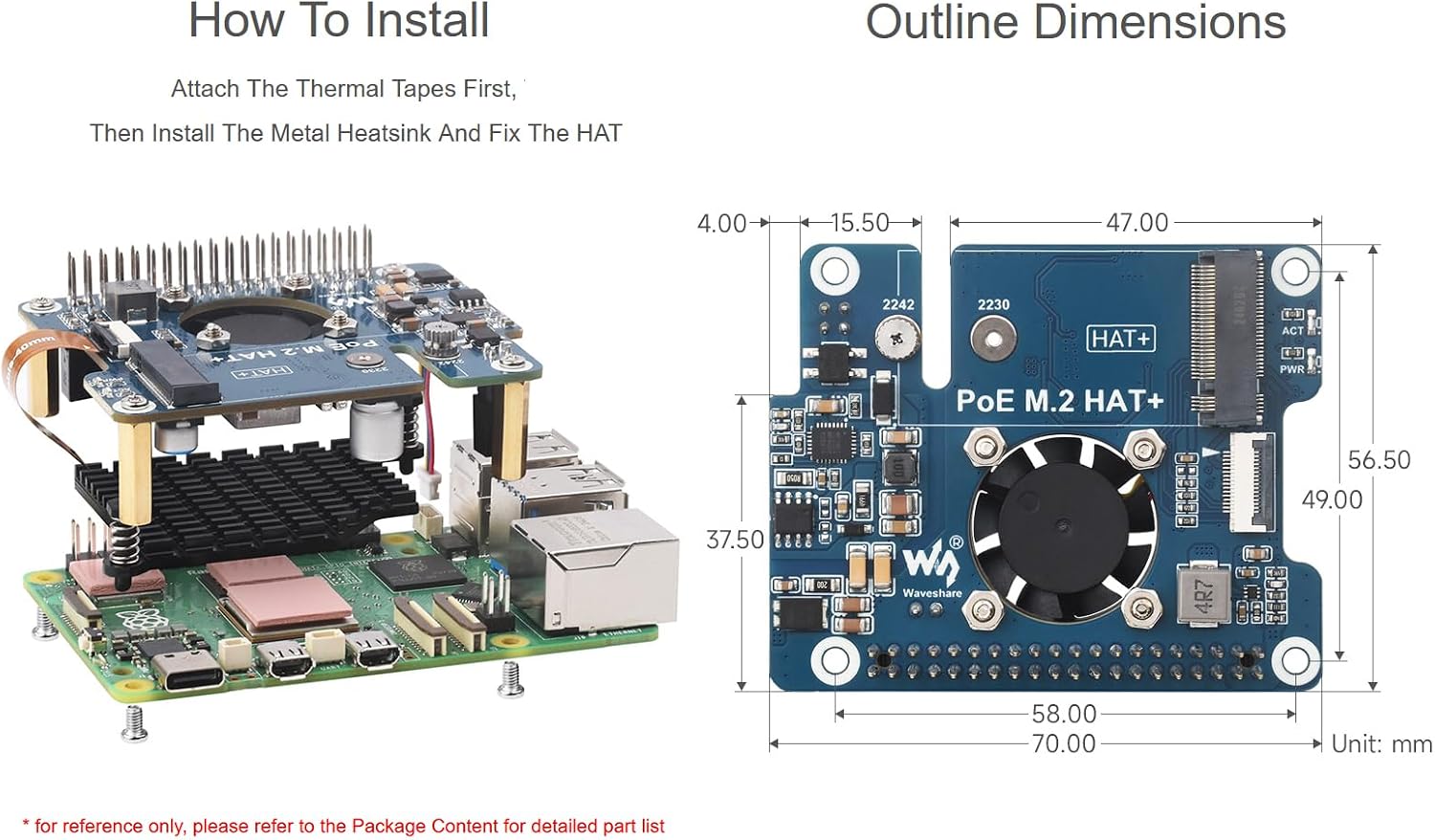
For a Raspberry Pi that will live in a network rack or home server setup, combining PoE and NVMe can be extremely useful.
The Waveshare PoE M.2 HAT+ B supports 802.3af/at Power over Ethernet while providing an M.2 NVMe interface. The B version supports 2230, 2242, 2260 and 2280 drives.
That means one Ethernet cable can provide both networking and power to the Raspberry Pi.
Key features
- Raspberry Pi 5
- NVMe M.2 support
- 2230/2242/2260/2280
- PCIe Gen 2/3 support
- IEEE 802.3af/at PoE
- 40-pin GPIO header
- NVMe boot support
- 5V and 12V auxiliary outputs
- Cooling system included
Waveshare specifies up to 5V 4.5A output and a combined 12V/5V maximum of 25W for the B version.
Pros
- NVMe + PoE in one board
- Excellent for servers
- Supports 2280 SSDs
- Single network cable for power and data
- Auxiliary power outputs
- GPIO remains available
Cons
- More expensive
- More complex
- Requires a compatible PoE network
- Cooling configuration needs attention
Best for
Home servers, network appliances and rack-mounted Raspberry Pi projects.
Raspberry Pi M.2 HAT+ vs NVMe Base vs X1004
Here’s the quick comparison:
| Feature | Raspberry Pi M.2 HAT+ | Pimoroni NVMe Base | Geekworm X1004 |
|---|---|---|---|
| Raspberry Pi 5 | ✅ | ✅ | ✅ |
| NVMe | ✅ | ✅ | ✅ |
| 2230 | ✅ | ✅ | — |
| 2242 | ✅ | ✅ | — |
| 2260 | — | ✅ | — |
| 2280 | ❌ | ✅ | ✅ |
| Number of SSDs | 1 | 1 | 2 |
| PCIe 2.0 | ✅ | — | ✅ |
| NVMe boot | ✅ | ✅ | ✅ |
| GPIO access | ✅ | — | ✅ |
| Best use | General | Server | NAS |
The biggest decision is therefore not simply which HAT is fastest. It is which storage configuration fits your Raspberry Pi project.
What Is an NVMe HAT?
An NVMe HAT is an expansion board that allows a Raspberry Pi to connect to an M.2 NVMe SSD through its PCIe interface.
The Raspberry Pi 5 exposes a single-lane PCIe 2.0 connection through a 16-pin connector. The official M.2 HAT+ converts that connection to an M.2 M-key interface.
This allows the Raspberry Pi to use significantly faster storage than a typical microSD card.
A typical setup looks like this:
Raspberry Pi 5
      │
      │ PCIe
      ▼
   NVMe HAT
      │
      │ M.2 M-Key
      ▼
   NVMe SSD
Why Use NVMe Instead of a microSD Card?
The biggest reason is storage performance.
An NVMe SSD offers substantially better random I/O performance and generally provides a better experience for workloads involving many small files.
This becomes particularly noticeable when using a Raspberry Pi as a:
- Docker server
- Home server
- NAS
- Nextcloud server
- Jellyfin server
- Database server
- Web server
- Development machine
- Monitoring server
Raspberry Pi itself describes its SSD solution as particularly useful for I/O-intensive applications and fast booting.
Is PCIe Gen 3 Worth Enabling?
This is one of the most misunderstood aspects of Raspberry Pi 5 NVMe storage.
The Raspberry Pi 5 hardware can expose PCIe Gen 3 speeds, but Raspberry Pi explicitly warns that the Pi 5 is not certified for PCIe Gen 3.0 and that Gen 3 connections may be unstable.
For most users, PCIe Gen 2 is the sensible default.
The official M.2 HAT+ is designed around PCIe 2.0 and provides up to 500 MB/s peak interface bandwidth.
If reliability is more important than benchmark numbers, don’t enable Gen 3 simply because your SSD supports it.
Can Raspberry Pi 5 Boot From NVMe?
Yes.
The Raspberry Pi 5 can boot Raspberry Pi OS from an NVMe drive attached through a compatible M.2 HAT.
The official documentation recommends installing the operating system to the NVMe drive using Raspberry Pi Imager. If an SD card is present, the Pi can be configured to prioritize NVMe through the boot-order settings in raspi-config.
For example:
sudo raspi-configThen navigate to:
Advanced Options
→ Boot Order
→ NVMe/USB boot
After changing the boot order:
sudo rebootWhat Size NVMe SSD Should You Buy?
The right capacity depends on what you’re doing.
| Capacity | Recommended Use |
|---|---|
| 128GB | Basic Raspberry Pi OS |
| 256GB | Desktop / Docker |
| 500GB | Home server |
| 1TB | NAS / media / Nextcloud |
| 2TB | Large home server |
| 4TB+ | NAS / storage server |
For a new Raspberry Pi 5 server, 500GB–1TB is the sweet spot for many users.
If you’re running Docker containers such as Nextcloud, Jellyfin, Pi-hole and other services, having more storage also gives you room for Docker images, databases, application data and backups.
Best NVMe HAT for Docker
If your primary goal is Docker, I’d choose between:
Best overall: Raspberry Pi M.2 HAT+
It’s inexpensive, simple and officially supported.
Best for 2280 SSDs: Pimoroni NVMe Base
The under-board design and 2230–2280 compatibility make it attractive for a Docker home server.
Best for multiple drives: Geekworm X1004
Choose this if your Docker server is also becoming a storage server or NAS.
You can use NVMe storage for Docker’s data directory:
docker infoand check your Docker storage location:
docker info | grep "Docker Root Dir"Best NVMe HAT for a Raspberry Pi NAS
For a NAS, I’d favor Geekworm X1004 if you specifically want two NVMe drives.
The ability to install two 2280 SSDs makes it considerably more flexible than a single-drive adapter. Geekworm advertises support for up to two 4TB drives.
However, an important distinction is that two NVMe drives don’t automatically mean RAID.
You’ll need to configure the storage architecture yourself using Linux software such as:
- RAID
- ZFS
- Btrfs
- mergerfs
- SnapRAID
depending on the requirements of your NAS.
Best NVMe HAT for a Raspberry Pi Home Server
For a typical home server, my ranking would be:
- Pimoroni NVMe Base — excellent 2280 compatibility
- Raspberry Pi M.2 HAT+ — simplest official option
- Waveshare PoE M.2 HAT+ B — best if you want PoE
- Geekworm X1004 — best for multiple NVMe drives
If you’re building a server with Docker, I’d prioritize reliability, cooling and storage capacity over chasing the highest possible PCIe benchmark.
NVMe HAT Cooling
Don’t forget cooling.
The Raspberry Pi 5 can generate significantly more heat than earlier Raspberry Pi models, particularly under sustained workloads.
An NVMe SSD can also become warm during continuous writes.
For a server, consider:
- Raspberry Pi Active Cooler
- A case with active airflow
- NVMe heatsink
- Good ventilation
- Monitoring SSD temperatures
The official M.2 HAT+ is designed to work with the Raspberry Pi Active Cooler, while other HATs have their own mechanical and cooling requirements.
Official Raspberry Pi M.2 HAT+ Compact
There is also a newer M.2 HAT+ Compact.
Raspberry Pi M.2 HAT+ Compact documentation
The Compact model is designed specifically to work inside the official Raspberry Pi 5 case. It supports 2230 M.2 devices and leaves room for the case’s integrated fan.
This makes it an excellent choice if you want:
Raspberry Pi 5 + official case + NVMe SSD
without having a large HAT sticking out of the enclosure.
The tradeoff is that you’re limited to 2230 SSDs.
Which NVMe HAT Should You Buy?
🏆 Best Overall
Raspberry Pi M.2 HAT+
The best choice for most Raspberry Pi 5 owners.
💰 Best Budget
Waveshare PCIe to M.2 HAT+
A low-cost way to add NVMe storage.
📦 Best for 2280 SSDs
Pimoroni NVMe Base
Excellent if you already have a standard 2280 NVMe drive.
🗄️ Best for NAS
Geekworm X1004
The dual-NVMe design makes it ideal for larger storage projects.
⚡ Best for PoE Servers
Waveshare PoE M.2 HAT+ B
Excellent for network appliances and always-on home servers.
🧩 Best for Official Raspberry Pi Case
Raspberry Pi M.2 HAT+ Compact
The cleanest option for an NVMe-equipped Raspberry Pi 5 inside the official case.
Final Verdict
The Raspberry Pi M.2 HAT+ remains the safest recommendation for most Raspberry Pi 5 users. It is inexpensive, officially supported, supports NVMe booting and integrates cleanly with the Raspberry Pi ecosystem.
But it isn’t necessarily the best HAT for every project.
If you’re building a Docker server, look at the Pimoroni NVMe Base. If you’re building a NAS, the Geekworm X1004 is much more interesting because it supports two 2280 drives. And if you’re building a network appliance where you want power and storage over a single Ethernet cable, the Waveshare PoE M.2 HAT+ B deserves a close look.
For a new Raspberry Pi 5 home server in 2026, my preferred setup would be:
Raspberry Pi 5 + Active Cooler + 1TB NVMe SSD + NVMe HAT + 64-bit Raspberry Pi OS
That provides a strong foundation for Docker, Nextcloud, Jellyfin, Pi-hole, Tailscale and other self-hosted services.
Frequently Asked Questions
Does Raspberry Pi 5 support NVMe?
Yes. Raspberry Pi 5 exposes a PCIe interface that can be connected to an NVMe SSD through an M.2 HAT or compatible adapter.
Can Raspberry Pi 5 boot directly from NVMe?
Yes. Raspberry Pi 5 supports booting Raspberry Pi OS from an NVMe drive connected through a compatible HAT.
Is an NVMe HAT faster than an SD card?
For storage-intensive workloads, NVMe generally provides substantially better I/O performance than microSD storage. Raspberry Pi specifically positions its SSD solution for I/O-intensive applications and fast booting.
Can I use a 2280 NVMe SSD with the official Raspberry Pi M.2 HAT+?
No. The standard official M.2 HAT+ supports 2230 and 2242 form factors. For a 2280 drive, use a compatible third-party board such as the Pimoroni NVMe Base or Geekworm X1004.
Is PCIe Gen 3 safe on Raspberry Pi 5?
Raspberry Pi warns that the Pi 5 is not certified for Gen 3 and that Gen 3 connections may be unstable. For a reliable server, PCIe Gen 2 is generally the safer choice.
Recommended links
- Docker Containers for Raspberry Pi
- Best Raspberry Pi Cases in 2026
- Best Single Board Computers for Home Servers
- Raspberry Pi VPN Server with WireGuard
- Install Jellyfin on Raspberry Pi
- Install Nextcloud on Raspberry Pi
- Install Portainer on Raspberry Pi
- Install Tailscale on Raspberry Pi
- Top 10 Single Board Computers in 2026
- Single Board Computer Comparison List