CPU: Broadcom BCM2710A1 1024 MHz | 4 Cores | ARMv8
RAM: 512 MB LPDDR2
Ethernet Interfaces Qty: 0
Gigabit Ethernet: No
USB Ports Qty: 1
USB 3.0: No
Wi-Fi+BT: Yes
Wi-Fi 6: No
NVMe Port: No
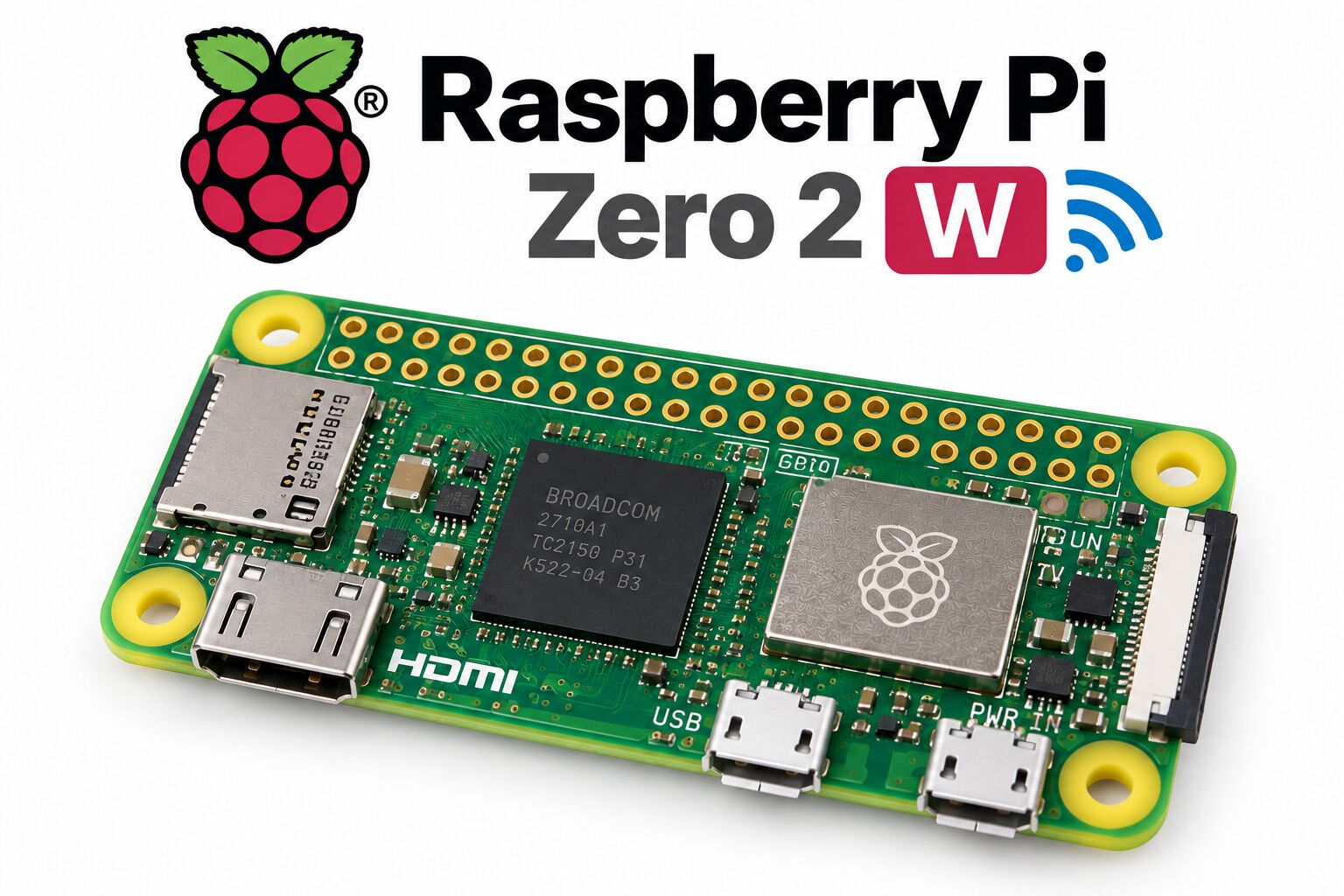
The Raspberry Pi Zero 2 W is a tiny wireless single-board computer designed for projects where size, power consumption and cost are more important than raw performance.
Measuring just 65 × 30mm, the Zero 2 W packs a quad-core 64-bit Arm Cortex-A53 processor, 512MB of LPDDR2 memory, 2.4GHz Wi-Fi and Bluetooth 4.2 into the same compact form factor as the original Raspberry Pi Zero.
Despite its small size, the Zero 2 W is considerably more capable than the original Raspberry Pi Zero. Raspberry Pi states that it can deliver up to five times the multi-threaded performance of the original Zero.
Its combination of low power consumption, wireless connectivity and tiny dimensions makes it particularly useful for IoT devices, sensors, cameras, robots, network projects and embedded applications.
Raspberry Pi Zero 2 W Specifications
| Specification | Raspberry Pi Zero 2 W |
|---|---|
| SoC | Raspberry Pi RP3A0 |
| CPU | Quad-core 64-bit Arm Cortex-A53 |
| CPU speed | 1GHz |
| RAM | 512MB LPDDR2 |
| GPU | VideoCore IV |
| Wi-Fi | 2.4GHz 802.11b/g/n |
| Bluetooth | Bluetooth 4.2 + BLE |
| Ethernet | No |
| USB | 1 × micro USB OTG |
| Video output | Mini HDMI |
| Storage | microSD |
| Camera | CSI-2 |
| GPIO | 40-pin footprint |
| Power | Micro USB |
| Dimensions | 65 × 30mm |
| Weight | Approximately 12g |
The official product documentation specifies a 1GHz quad-core Cortex-A53 processor, 512MB LPDDR2 memory, 2.4GHz 802.11b/g/n wireless networking, Bluetooth 4.2/BLE, a microSD slot, mini HDMI, USB OTG and a CSI-2 camera connector.
A Tiny Raspberry Pi With Four CPU Cores
The biggest improvement over the original Raspberry Pi Zero is the processor.
The Zero 2 W uses a quad-core 64-bit Arm Cortex-A53 CPU running at 1GHz.
The processor is integrated into Raspberry Pi’s RP3A0 system-in-package, which also incorporates 512MB of LPDDR2 memory.
The result is a much more capable board while retaining the extremely small Zero form factor.
Raspberry Pi reports approximately 40% more single-threaded performance and five times the multi-threaded performance compared with the original Raspberry Pi Zero.
This makes the Zero 2 W considerably more useful for applications that need actual processing power rather than simply reading sensors or controlling GPIO devices.
Raspberry Pi Zero 2 W Size
One of the biggest reasons to choose the Zero 2 W is its size.
The board measures only:
65 × 30mm
That makes it dramatically smaller than boards such as the Raspberry Pi 4 and Raspberry Pi 5.
This makes the Zero 2 W particularly useful when you’re designing something that needs to fit inside:
- A small enclosure
- A robot
- A camera
- A sensor
- A handheld device
- A custom electronics project
- A smart-home device
The Zero 2 W retains the same physical form factor as the original Raspberry Pi Zero, which also means many existing Zero accessories and cases are compatible.
Raspberry Pi Zero 2 W Wireless Connectivity
The W in Raspberry Pi Zero 2 W is important.
The board includes wireless networking without requiring an external Wi-Fi adapter.
It supports:
- 2.4GHz 802.11b/g/n Wi-Fi
- Bluetooth 4.2
- Bluetooth Low Energy
The wireless hardware uses an onboard antenna, keeping the board extremely compact.
This makes the Zero 2 W particularly convenient for IoT projects.
For example:
Sensor
   │
   ↓
Raspberry Pi Zero 2 W
   │
   ├── Wi-Fi ──→ Home network
   │
   └── Bluetooth ──→ BLE device
You don’t need to connect an Ethernet cable or USB Wi-Fi adapter.
Raspberry Pi Zero 2 W Does Not Have Ethernet
One important limitation is the lack of a built-in Ethernet port.
Unlike larger Raspberry Pi models, the Zero 2 W relies on Wi-Fi for network connectivity.
For most wireless projects, this isn’t a problem.
However, if you’re building a server that needs a wired network connection, a Raspberry Pi 4 or Raspberry Pi 5 will usually be a better choice.
You can use USB networking adapters with the Zero 2 W, but doing so works against one of its biggest advantages: its small size.
Raspberry Pi Zero 2 W Ports
Despite its small dimensions, the board includes several useful interfaces.
Mini HDMI
The Zero 2 W includes a mini HDMI port for video output.
It supports HDMI video output and can decode H.264 and MPEG-4 video at up to 1080p30.
You’ll need a mini-HDMI adapter or appropriate cable to connect it to a standard HDMI display.
Micro USB OTG
The board includes one micro USB OTG port.
USB OTG allows the port to operate as a USB host when appropriate hardware and adapters are used.
This can be useful for connecting:
- Keyboards
- Mice
- USB storage
- Network adapters
- Other USB peripherals
Keep in mind that the Zero 2 W only has one USB OTG port, so you’ll need an adapter or hub if you want to connect multiple USB devices.
Micro USB Power
A second micro USB connector is used for power.
The official product brief specifies a 5V DC power input.
Because the Zero 2 W is designed as a small, low-power board, its power requirements are significantly lower than those of larger Raspberry Pi models.
Raspberry Pi Zero 2 W Storage
The Raspberry Pi Zero 2 W uses a microSD card for operating-system and application storage.
There is no onboard eMMC or NVMe interface.
A microSD card can contain:
- Raspberry Pi OS
- Applications
- Configuration files
- Project files
- Databases
- Scripts
For many Zero 2 W projects, a microSD card is perfectly adequate.
If you’re building a device that performs frequent writes, however, storage reliability should be considered carefully.
Raspberry Pi Zero 2 W GPIO
The Zero 2 W has a 40-pin GPIO footprint, but the pins are not populated with a physical header by default.
That means you can solder a 40-pin header onto the board if your project requires access to the GPIO pins.
The GPIO interface allows the Zero 2 W to interact with external electronics such as:
- LEDs
- Buttons
- Sensors
- Relays
- Displays
- Motors
- Cameras
- HATs
Raspberry Pi identifies the GPIO footprint as HAT-compatible.
This makes the Zero 2 W particularly interesting for embedded projects where you want both wireless connectivity and hardware control.
Raspberry Pi Zero 2 W Camera Projects
The Zero 2 W includes a CSI-2 camera connector.
This makes it possible to build compact wireless camera projects.
Potential applications include:
- Security cameras
- Time-lapse cameras
- Wildlife cameras
- Remote monitoring
- Robotics
- Computer vision experiments
- Baby monitors
- DIY webcams
A camera cable or appropriate adapter is required because of the Zero’s smaller connector format.
Raspberry Pi Zero 2 W for IoT
IoT is arguably one of the best applications for the Zero 2 W.
Its combination of:
- Small size
- Low power consumption
- Wi-Fi
- Bluetooth
- GPIO
- Camera support
- Linux
- Quad-core CPU
makes it a flexible platform for connected devices.
For example:
       Sensor
          │
          ↓
 Raspberry Pi Zero 2 W
          │
      Wi-Fi
          │
          ↓
    Home Network
          │
          ↓
     Web Server
The Zero 2 W can collect sensor data and send it to another computer or cloud service over the network.
Raspberry Pi Zero 2 W for Home Automation
The Zero 2 W can be useful for small home-automation projects.
Examples include:
- Temperature sensors
- Door sensors
- Motion detectors
- Smart switches
- Environmental monitoring
- Bluetooth devices
- Network-connected displays
Its small size allows it to be installed in places where a larger Raspberry Pi would be inconvenient.
Raspberry Pi Zero 2 W for Pi-hole
The Zero 2 W can also be used for lightweight network services such as Pi-hole.
Its 512MB of RAM is limited compared with modern Raspberry Pi models, but Pi-hole is relatively lightweight.
For a dedicated Pi-hole installation, the Zero 2 W can therefore be an attractive low-cost option.
If you want to run Pi-hole alongside numerous other services, however, a Raspberry Pi with more RAM would be a better choice.
Raspberry Pi Zero 2 W for VPN
The Zero 2 W can also be used for lightweight VPN and networking projects.
For example, it can run software such as:
- Tailscale
- WireGuard
- SSH
- Network monitoring tools
The main limitation is networking performance.
Because the Zero 2 W uses 2.4GHz Wi-Fi and has no built-in Ethernet, it isn’t the best choice for a high-throughput VPN gateway.
For that type of project, a Raspberry Pi 4 or Raspberry Pi 5 is more appropriate.
Raspberry Pi Zero 2 W for Retro Gaming
The Zero 2 W can be used to build compact retro gaming systems.
Its small size makes it particularly attractive for handheld projects.
Possible applications include:
- Game Boy-style handhelds
- Portable retro consoles
- Arcade controllers
- Emulation projects
However, its 512MB of RAM and modest processor mean that it shouldn’t be considered a replacement for a Raspberry Pi 5 for demanding emulation.
The Zero 2 W is best suited to older systems and lightweight emulation.
Raspberry Pi Zero 2 W for Docker
Docker can run on the Zero 2 W, but this isn’t where the board is strongest.
The main limitation is its 512MB of RAM.
A few lightweight containers may work, but running a large collection of services can quickly exhaust available memory.
For example:
Raspberry Pi Zero 2 W
        │
      Docker
        │
   ┌────┴────┐
   │         │
Small App  Small App
For larger Docker projects, consider a Raspberry Pi 4 or Raspberry Pi 5 instead.
Raspberry Pi Zero 2 W vs Raspberry Pi Zero W
The Zero 2 W is a significant upgrade over the original Zero W.
| Feature | Zero W | Zero 2 W |
|---|---|---|
| CPU | Single-core Arm11 | Quad-core Cortex-A53 |
| CPU speed | 1GHz | 1GHz |
| Architecture | 32-bit | 64-bit |
| RAM | 512MB | 512MB |
| Wi-Fi | 2.4GHz 802.11n | 2.4GHz 802.11b/g/n |
| Bluetooth | 4.1 | 4.2 |
| GPIO | 40-pin footprint | 40-pin footprint |
| Camera | CSI | CSI-2 |
| Size | 65 × 30mm | 65 × 30mm |
The most important difference is the processor.
The Zero 2 W moves from a single-core 32-bit processor to a quad-core 64-bit Cortex-A53. Raspberry Pi reports up to five times the multi-threaded performance of the original Zero.
Raspberry Pi Zero 2 W vs Raspberry Pi 4
These boards are designed for very different purposes.
| Feature | Zero 2 W | Raspberry Pi 4 |
|---|---|---|
| CPU cores | 4 | 4 |
| CPU architecture | Cortex-A53 | Cortex-A72 |
| RAM | 512MB | Up to 8GB |
| Ethernet | No | Gigabit |
| Wi-Fi | 2.4GHz | Dual-band |
| USB | 1 × OTG | 4 × USB |
| Display | Mini HDMI | Micro HDMI |
| Size | 65 × 30mm | 85 × 56mm |
Choose the Zero 2 W when size, power consumption and wireless connectivity are the priority.
Choose a Raspberry Pi 4 when you need significantly more memory, faster networking and more peripherals.
Raspberry Pi Zero 2 W vs Raspberry Pi 5
The difference is even more significant.
The Raspberry Pi 5 is dramatically more powerful and offers substantially more RAM, faster networking, USB 3.0, PCIe and much greater overall performance.
But the Zero 2 W has one major advantage:
size.
The Zero 2 W measures only 65 × 30mm.
That makes it much easier to integrate into small electronics projects.
Choose the Zero 2 W for:
- IoT
- Sensors
- Small cameras
- Embedded projects
- Robots
- Wearables
- Small wireless devices
Choose the Raspberry Pi 5 for:
- Desktop computing
- Large servers
- Docker
- AI
- Gaming
- Development
- Virtualization
- Heavy workloads
Raspberry Pi Zero 2 W Power Consumption
Power efficiency is another reason to choose the Zero 2 W.
The board was designed for applications where a larger Raspberry Pi would consume unnecessary space and power.
This makes it useful for:
- Battery-powered projects
- Remote sensors
- Portable electronics
- Solar-powered projects
- Embedded devices
- Wireless monitoring systems
Actual power consumption depends heavily on CPU usage, Wi-Fi activity, connected peripherals and the operating system configuration.
Raspberry Pi Zero 2 W Cases
Because the Zero 2 W retains the original Zero form factor, many Raspberry Pi Zero cases are compatible.
Raspberry Pi specifically notes that the Zero 2 W fits inside most existing Raspberry Pi Zero cases.
This gives you a large ecosystem of cases and accessories to choose from.
For projects involving GPIO, cameras or other hardware, make sure the case provides access to the connectors you need.
Who Should Buy the Raspberry Pi Zero 2 W?
The Raspberry Pi Zero 2 W is a particularly good choice when you need a small Linux computer with wireless connectivity.
It’s well suited for:
- IoT projects
- Smart-home devices
- Wireless sensors
- Security cameras
- Time-lapse cameras
- Robotics
- Portable electronics
- Retro gaming
- Network monitoring
- Pi-hole
- Lightweight VPN projects
- Bluetooth projects
- GPIO projects
It’s less suitable for:
- Large Docker environments
- Desktop replacement
- Heavy development
- Virtual machines
- Large databases
- High-performance servers
- Demanding AI workloads
Raspberry Pi Zero 2 W Pros and Cons
Pros
- Extremely small
- Quad-core 64-bit processor
- 2.4GHz Wi-Fi built in
- Bluetooth 4.2 and BLE
- Camera interface
- GPIO support
- Very low power requirements
- Large Raspberry Pi accessory ecosystem
- Excellent for embedded projects
- Inexpensive compared with larger Raspberry Pi models
Cons
- Only 512MB RAM
- No built-in Ethernet
- Only one USB OTG port
- Micro USB power
- Mini HDMI instead of full-size HDMI
- No USB 3.0
- Not suitable for demanding server workloads
Is Raspberry Pi Zero 2 W Still Worth Buying?
Yes, if you need a small Raspberry Pi.
The Zero 2 W isn’t intended to compete with the Raspberry Pi 5 on performance.
Its advantage is the combination of size, wireless connectivity, low power consumption and Linux compatibility.
For a compact sensor, camera, robot or IoT device, the Zero 2 W can be a much better choice than a larger and more powerful Raspberry Pi.
Raspberry Pi currently states that the Zero 2 W will remain in production until at least January 2030, which also makes it a practical platform for projects that need a long product lifetime.
Raspberry Pi Zero 2 W: Final Verdict
The Raspberry Pi Zero 2 W is one of the best Raspberry Pi boards for projects where physical size matters.
Its 1GHz quad-core Cortex-A53 processor isn’t designed for demanding workloads, and 512MB of RAM is a significant limitation compared with newer Raspberry Pi models.
But that’s not what makes the Zero 2 W attractive.
Its strengths are:
65 × 30mm size + Wi-Fi + Bluetooth + GPIO + camera support + Linux.
That combination makes it an excellent platform for IoT, robotics, cameras, sensors, home automation and other embedded projects.
Rating
| Category | Rating |
|---|---|
| Performance | 3.5/5 |
| Size | 5/5 |
| Connectivity | 4/5 |
| Power efficiency | 5/5 |
| Project potential | 5/5 |
| Value | 5/5 |
| Overall | 4.5/5 |
Best for: IoT, cameras, sensors, robotics, home automation and compact wireless projects.
Not ideal for: demanding servers, desktop computing or heavy Docker workloads.
Frequently Asked Questions
How much RAM does the Raspberry Pi Zero 2 W have?
The Raspberry Pi Zero 2 W has 512MB of LPDDR2 RAM.
Does Raspberry Pi Zero 2 W have Wi-Fi?
Yes. It includes 2.4GHz 802.11b/g/n Wi-Fi.
Does Raspberry Pi Zero 2 W have Bluetooth?
Yes. It includes Bluetooth 4.2 and Bluetooth Low Energy.
Does Raspberry Pi Zero 2 W have Ethernet?
No. There is no built-in Ethernet port. Network connectivity is provided by Wi-Fi, although USB Ethernet adapters can be used.
Can Raspberry Pi Zero 2 W run Raspberry Pi OS?
Yes. The Zero 2 W is designed to run Raspberry Pi OS and other compatible Linux distributions.
Can Raspberry Pi Zero 2 W run Docker?
Yes, but its 512MB RAM limits how many and how demanding your containers can be. For larger Docker installations, a Raspberry Pi 4 or Raspberry Pi 5 is a better choice.
Can Raspberry Pi Zero 2 W run Pi-hole?
Yes. Its low resource requirements make Pi-hole one of the more appropriate server applications for the Zero 2 W.
Can Raspberry Pi Zero 2 W run Jellyfin?
It can be used for lightweight media-server experimentation, but its limited RAM and processing power make it a poor choice for demanding Jellyfin workloads or video transcoding.
Does Raspberry Pi Zero 2 W have GPIO?
Yes. It has a HAT-compatible 40-pin GPIO footprint, although the header is not populated by default.
Can Raspberry Pi Zero 2 W connect to a camera?
Yes. It includes a CSI-2 camera connector.
How big is Raspberry Pi Zero 2 W?
The board measures 65 × 30mm.