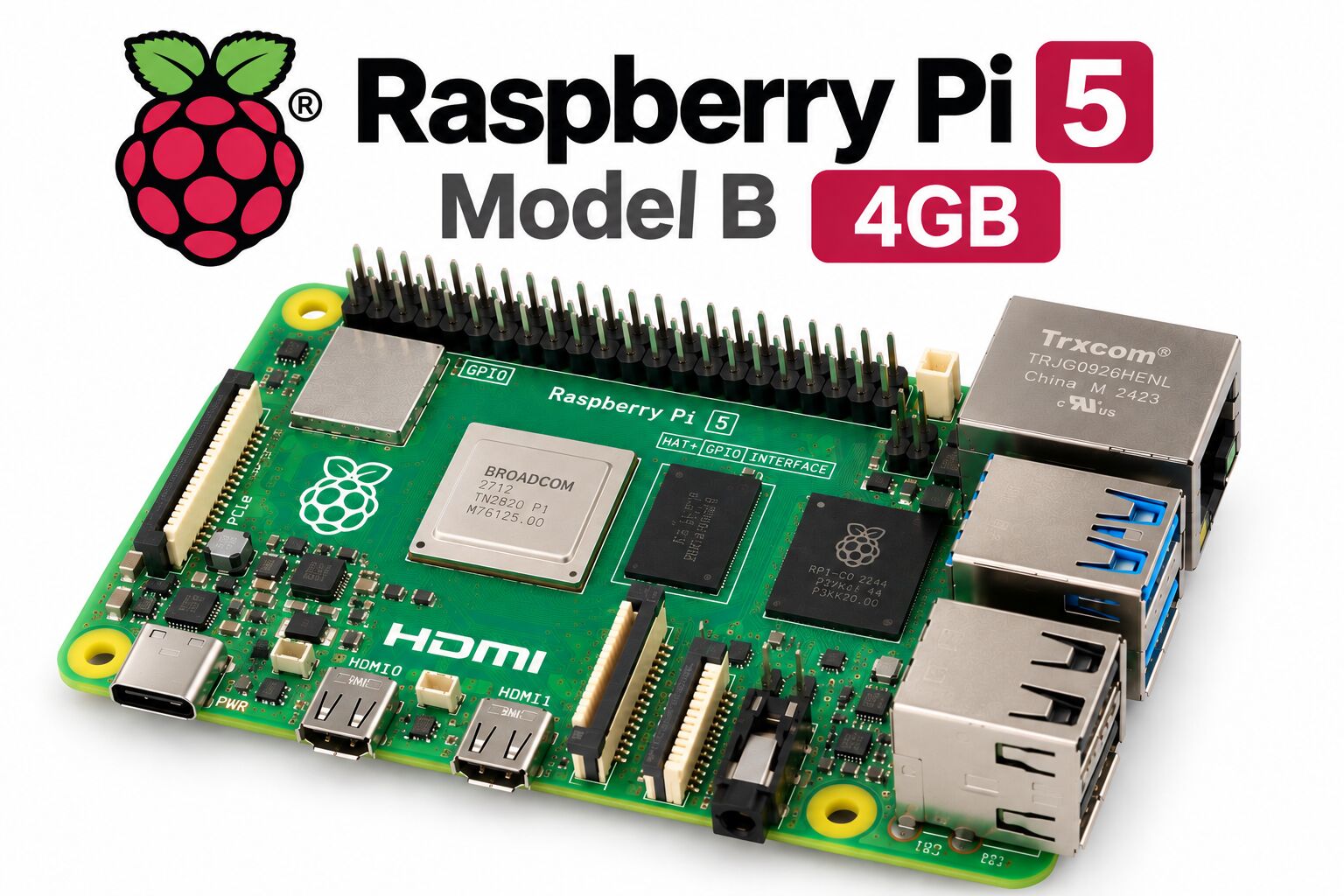
CPU: Broadcom BCM2712 2400 MHz | 4 Cores | ARMv8
RAM: 4096 MB LPDDR4
Ethernet Interfaces Qty: 1
Gigabit Ethernet: Yes
USB Ports Qty: 4
USB 3.0: Yes
Wi-Fi+BT: Yes
Wi-Fi 6: No
NVMe Port: No
The Raspberry Pi 5 4GB is one of the most versatile versions of the Raspberry Pi 5. It combines the same powerful quad-core processor found in the larger-memory models with 4GB of LPDDR4X RAM.
For many Raspberry Pi projects, 4GB is enough.
You can use it as a desktop computer, home server, media server, development machine, retro gaming system, network appliance and much more.
The biggest advantage of the 4GB model is that you get the full Raspberry Pi 5 platform without paying for memory that your project may never use.
Raspberry Pi 5 4GB Specifications
| Specification | Raspberry Pi 5 4GB |
|---|---|
| Processor | Broadcom BCM2712 |
| CPU | Quad-core 64-bit Arm Cortex-A76 |
| CPU speed | 2.4GHz |
| GPU | VideoCore VII |
| RAM | 4GB LPDDR4X-4267 |
| Storage | microSD, USB, NVMe via PCIe |
| Ethernet | Gigabit Ethernet |
| Wi-Fi | Dual-band 802.11ac |
| Bluetooth | Bluetooth 5.0 / BLE |
| USB | 2 × USB 3.0, 2 × USB 2.0 |
| Display | 2 × micro-HDMI |
| Video | Up to dual 4Kp60 |
| PCIe | PCIe 2.0 x1 |
| GPIO | 40-pin |
| Power | USB-C, 5V/5A |
| Dimensions | 85 × 56mm |
The Raspberry Pi 5 uses a 2.4GHz quad-core Cortex-A76 processor, VideoCore VII graphics, dual-band 802.11ac Wi-Fi, Bluetooth 5.0, Gigabit Ethernet, two USB 3.0 ports, two USB 2.0 ports and a PCIe 2.0 x1 interface.
Raspberry Pi 5 4GB Performance
The 4GB Raspberry Pi 5 uses the same processor as the 8GB and 16GB versions.
That means choosing 4GB doesn’t mean choosing a slower CPU.
The main difference is memory capacity.
For applications that use less than 4GB of RAM, the 4GB model can perform similarly to the higher-memory versions.
This makes it particularly attractive for projects where RAM isn’t the limiting factor.
What Can You Do With a Raspberry Pi 5 4GB?
The 4GB model is suitable for a wide variety of projects.
Desktop Computer
Raspberry Pi OS can turn the Raspberry Pi 5 into a compact Linux desktop.
You can use it for:
- Web browsing
- Programming
- Documents
- Education
- Basic multimedia
- Linux experimentation
Home Server
The Raspberry Pi 5 4GB can also work very well as a small home server.
Potential projects include:
- Pi-hole
- Tailscale
- WireGuard
- Jellyfin
- Docker
- Portainer
- Web servers
- File servers
- Home automation
Retro Gaming
The Raspberry Pi 5 has enough processing power for a capable retro gaming system.
For a dedicated gaming build, spending more on 8GB or 16GB RAM generally doesn’t provide much benefit.
Programming
The Raspberry Pi 5 4GB is also an excellent development machine.
You can use it to learn:
- Python
- C
- C++
- JavaScript
- Linux
- Docker
- Git
- Web development
Raspberry Pi 5 4GB for Docker
4GB is enough for a number of Docker containers, particularly lightweight services.
For example:
Raspberry Pi 5 4GB
       │
     Docker
       │
 ┌─────┼─────┐
 │     │     │
Pi-hole Tailscale Portainer
If you plan to run a large number of containers simultaneously, the 8GB model provides more headroom.
Raspberry Pi 5 4GB for Home Assistant
The 4GB Raspberry Pi 5 is more than capable of running Home Assistant.
If you’re buying a Raspberry Pi specifically for Home Assistant, there’s little reason to pay for 16GB of RAM.
You can also run additional services alongside Home Assistant, although the number of services you can comfortably run depends on their individual memory requirements.
Raspberry Pi 5 4GB for Minecraft
A Raspberry Pi 5 4GB can be used for a small Minecraft server.
However, if you’re planning to host several players or run Minecraft alongside other applications, the 8GB model provides more memory headroom.
For a small private server, however, 4GB can be a reasonable starting point.
Storage Options
The Raspberry Pi 5 includes a high-speed microSD card slot, but you aren’t limited to microSD storage.
It also provides a PCIe 2.0 x1 interface.
With a compatible M.2 HAT or adapter, you can connect an NVMe SSD.
For server projects, an NVMe SSD can be a significant upgrade.
A typical setup looks like:
Raspberry Pi 5
      │
    PCIe
      │
   M.2 HAT
      │
   NVMe SSD
Cooling
The Raspberry Pi 5 can benefit from active cooling when running sustained workloads.
For lightweight projects, cooling requirements are less demanding.
For servers, Docker, gaming and compilation workloads, an active cooler or fan-equipped case is recommended.
Power Requirements
The Raspberry Pi 5 is designed for USB-C power and supports 5V/5A power input.
Raspberry Pi specifies a 5V/5A USB-C power configuration, with lower-power operation also possible with limitations on peripheral power.
Use a reliable power supply, particularly when connecting USB storage or other peripherals.
Raspberry Pi 5 4GB vs 8GB
The biggest question is whether you should buy 4GB or 8GB.
| 4GB | 8GB | |
|---|---|---|
| CPU | Same | Same |
| GPU | Same | Same |
| RAM | 4GB | 8GB |
| Basic projects | Excellent | Excellent |
| Docker | Good | Better |
| Home server | Good | Better |
| Heavy multitasking | Limited | Better |
| Price | Lower | Higher |
If your project doesn’t need more than 4GB, the 4GB version provides excellent value.
For a general-purpose home server, I’d choose 8GB.
Who Should Buy the Raspberry Pi 5 4GB?
The 4GB model is a good choice if you’re building:
- A Raspberry Pi desktop
- Retro gaming system
- Pi-hole server
- Home Assistant system
- Small Docker server
- VPN server
- Programming computer
- GPIO project
- Lightweight web server
Verdict
The Raspberry Pi 5 4GB is the best choice when you want Raspberry Pi 5 performance without paying for unnecessary RAM.
For most basic and moderately demanding projects, 4GB is enough.