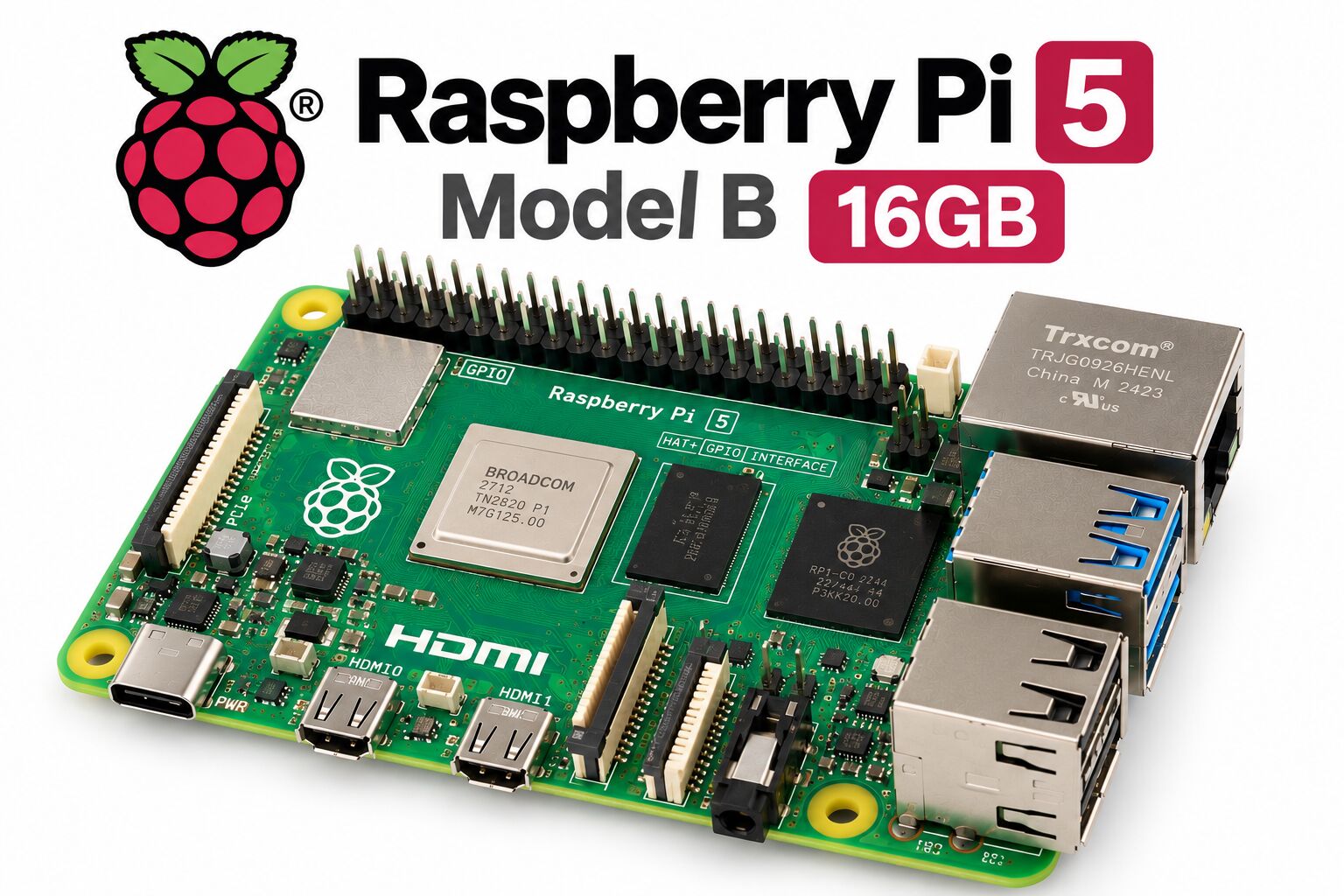
CPU: Broadcom BCM2712 2400 MHz | 4 Cores | ARMv8
RAM: 16384 MB LPDDR4
Ethernet Interfaces Qty: 1
Gigabit Ethernet: Yes
USB Ports Qty: 4
USB 3.0: Yes
Wi-Fi+BT: Yes
Wi-Fi 6: No
NVMe Port: No
The Raspberry Pi 5 16GB is the highest-memory Raspberry Pi 5 configuration.
It combines the Raspberry Pi 5’s 2.4GHz quad-core Cortex-A76 processor with 16GB of LPDDR4X RAM, giving applications considerably more memory capacity than the 4GB and 8GB versions.
The important thing to understand is that 16GB doesn’t make the Raspberry Pi 5’s processor faster.
Instead, it allows the system to handle workloads that need more memory.
This makes the 16GB model particularly interesting for development, large Docker environments, AI experimentation, computational workloads and heavy multitasking.
Raspberry Pi 5 16GB Specifications
| Specification | Raspberry Pi 5 16GB |
|---|---|
| Processor | Broadcom BCM2712 |
| CPU | Quad-core 64-bit Arm Cortex-A76 |
| CPU speed | 2.4GHz |
| GPU | VideoCore VII |
| RAM | 16GB LPDDR4X-4267 |
| Storage | microSD, USB, NVMe via PCIe |
| Ethernet | Gigabit Ethernet |
| Wi-Fi | Dual-band 802.11ac |
| Bluetooth | Bluetooth 5.0 / BLE |
| USB | 2 × USB 3.0, 2 × USB 2.0 |
| Display | 2 × micro-HDMI |
| Video | Up to dual 4Kp60 |
| PCIe | PCIe 2.0 x1 |
| GPIO | 40-pin |
| Power | USB-C, 5V/5A |
| Dimensions | 85 × 56mm |
The official Raspberry Pi specification lists 16GB LPDDR4X-4267 memory alongside the same BCM2712 CPU, VideoCore VII GPU, Gigabit Ethernet, Wi-Fi, Bluetooth and PCIe interface found across the Raspberry Pi 5 platform.
Why Does Raspberry Pi 5 Need 16GB?
Most Raspberry Pi applications don’t.
Raspberry Pi itself has pointed to workloads such as large language models and computational applications as examples where additional memory can be useful.
The 16GB model therefore isn’t designed simply to make everyday Raspberry Pi applications faster.
It’s designed to provide more memory capacity.
Think of it this way:
8GB: enough workspace for most projects.
16GB: much more workspace for applications that need it.
Raspberry Pi 5 16GB Performance
The Raspberry Pi 5 16GB uses the same 2.4GHz quad-core Cortex-A76 processor as the other Raspberry Pi 5 memory configurations.
Therefore, a CPU-bound application doesn’t automatically become faster just because you have 16GB of RAM.
The advantage appears when the workload is memory-constrained.
For example, if an application needs 10GB of RAM:
- 4GB → insufficient
- 8GB → insufficient
- 16GB → enough capacity
That’s where the 16GB model can make a major difference.
Raspberry Pi 5 16GB for Docker
The 16GB model is particularly interesting for large Docker installations.
You can run many services simultaneously:
Raspberry Pi 5 16GB
        │
      Docker
        │
 ┌──────┼──────────────┐
 │      │              │
Nextcloud Jellyfin   Home Assistant
 │      │              │
Database │           Monitoring
 │      │              │
 └──────┴──────────────┘
If your Docker environment is relatively small, 8GB will probably be enough.
The 16GB model becomes worthwhile as the number and memory requirements of your containers increase.
Raspberry Pi 5 16GB for AI
AI is one of the more interesting applications for the 16GB Raspberry Pi 5.
Large models and computational workloads can require substantial amounts of memory.
Raspberry Pi specifically cited large language models as one of the workloads that can benefit from additional memory when it launched the 16GB model.
However, 16GB of system RAM should not be confused with dedicated GPU memory.
The Raspberry Pi 5 still uses its VideoCore VII GPU.
Raspberry Pi 5 16GB for Development
The 16GB model can also be useful as a development machine.
For example, you can run:
- IDE
- Multiple browsers
- Docker
- Databases
- Compilers
- Development servers
- Virtual machines
- Testing environments
The additional RAM gives you more flexibility when several memory-intensive applications are running simultaneously.
Raspberry Pi 5 16GB for Virtualization
If you’re experimenting with virtual machines or isolated development environments, additional RAM can be particularly valuable.
Instead of having the host operating system and virtual machines compete for a small memory pool, 16GB gives you significantly more capacity.
The actual number of usable virtual machines depends heavily on the operating systems and applications running inside them.
Raspberry Pi 5 16GB for Minecraft
You don’t need 16GB just to run a Minecraft server.
For most small Minecraft servers, the 8GB model is a more sensible choice.
The 16GB model becomes interesting when Minecraft is only one service on a larger server.
For example:
Minecraft
+
Jellyfin
+
Nextcloud
+
Docker
+
Database
+
Monitoring
In this situation, additional RAM can provide valuable headroom.
NVMe Storage
The Raspberry Pi 5 provides a PCIe 2.0 x1 interface for high-speed peripherals.
An M.2 HAT or compatible adapter can be used to connect an NVMe SSD.
For a 16GB server, NVMe is particularly attractive because applications that make heavy use of memory are often accompanied by demanding storage workloads.
A recommended configuration would be:
Raspberry Pi 5 16GB + NVMe SSD + active cooling + Ethernet
Cooling
The 16GB Raspberry Pi 5 uses the same fundamental processor platform as the other Raspberry Pi 5 versions.
For sustained workloads, active cooling is recommended.
This is especially important for:
- AI workloads
- Compilation
- Docker
- Virtual machines
- Servers
- Long-running computational workloads
Power Requirements
The Raspberry Pi 5 is designed around USB-C 5V/5A power.
Raspberry Pi specifies a 5V/5A USB-C configuration with Power Delivery support.
A quality power supply is particularly important for a heavily loaded Raspberry Pi 5 with USB peripherals and NVMe storage.
Raspberry Pi 5 16GB vs 8GB
This is the key purchasing decision.
| 8GB | 16GB | |
|---|---|---|
| CPU | 2.4GHz Cortex-A76 | 2.4GHz Cortex-A76 |
| CPU cores | 4 | 4 |
| GPU | VideoCore VII | VideoCore VII |
| RAM | 8GB | 16GB |
| Docker | Excellent | Excellent |
| Home server | Excellent | Excellent |
| Heavy multitasking | Very good | Excellent |
| AI | Good | Better |
| Virtualization | Good | Better |
| Value | Better | Lower |
If you’re not going to exceed 8GB of memory usage, the 16GB model provides little practical advantage.
Raspberry Pi 5 16GB Price
The 16GB model originally launched at $120 in January 2025.
Raspberry Pi subsequently increased the official price to $145 because of higher memory costs.
This is important when evaluating the 16GB model.
The additional memory is useful, but the price premium means that it shouldn’t be the automatic choice for ordinary Raspberry Pi projects.
Always check current retailer pricing before buying.
Who Should Buy the Raspberry Pi 5 16GB?
The 16GB version is best suited to users who specifically need additional memory.
Good examples include:
- Large Docker installations
- AI experimentation
- Virtual machines
- Software development
- Large compilation workloads
- Computational applications
- Heavy multitasking
- Advanced home servers
For basic Raspberry Pi projects, 4GB or 8GB is usually a better choice.
Raspberry Pi 5 16GB vs 4GB
The difference is substantial in memory capacity, but the CPU is fundamentally the same.
| 4GB | 16GB | |
|---|---|---|
| CPU | Same | Same |
| GPU | Same | Same |
| RAM | 4GB | 16GB |
| Basic projects | Excellent | Overkill |
| Docker | Good | Excellent |
| AI | Limited | Better |
| Virtualization | Limited | Better |
| Heavy multitasking | Limited | Excellent |
The 16GB model should therefore be purchased because you need the memory, not simply because it has the largest specification.
Is Raspberry Pi 5 16GB Worth It?
For most users, 8GB is the better value.
The 16GB model is worth considering if your workload regularly approaches the limits of an 8GB system.
If you’re building:
- a large home server
- an AI system
- a development workstation
- a virtualization environment
- a large Docker stack
then 16GB can be worthwhile.
For Home Assistant, Pi-hole, basic Docker, retro gaming or a simple web server, 16GB is generally unnecessary.
Raspberry Pi 5 16GB Verdict
The Raspberry Pi 5 16GB is the most capable Raspberry Pi 5 configuration when memory capacity is the limiting factor.
Its 2.4GHz Cortex-A76 processor, VideoCore VII GPU, Gigabit Ethernet, wireless connectivity, USB ports, GPIO and PCIe interface make it a highly flexible SBC.
But the 16GB model isn’t the best Raspberry Pi 5 for everyone.
Best for: AI experimentation, large Docker environments, virtualization, development and heavy multitasking.
For most users: choose the 8GB model.
For basic projects: the 4GB model is often enough.