CPU: Broadcom BCM2711 1800 MHz | 4 Cores | ARMv8
RAM: 8192 MB LPDDR4
Ethernet Interfaces Qty: 1
Gigabit Ethernet: Yes
USB Ports Qty: 4
USB 3.0: Yes
Wi-Fi+BT: Yes
Wi-Fi 6: No
NVMe Port: No
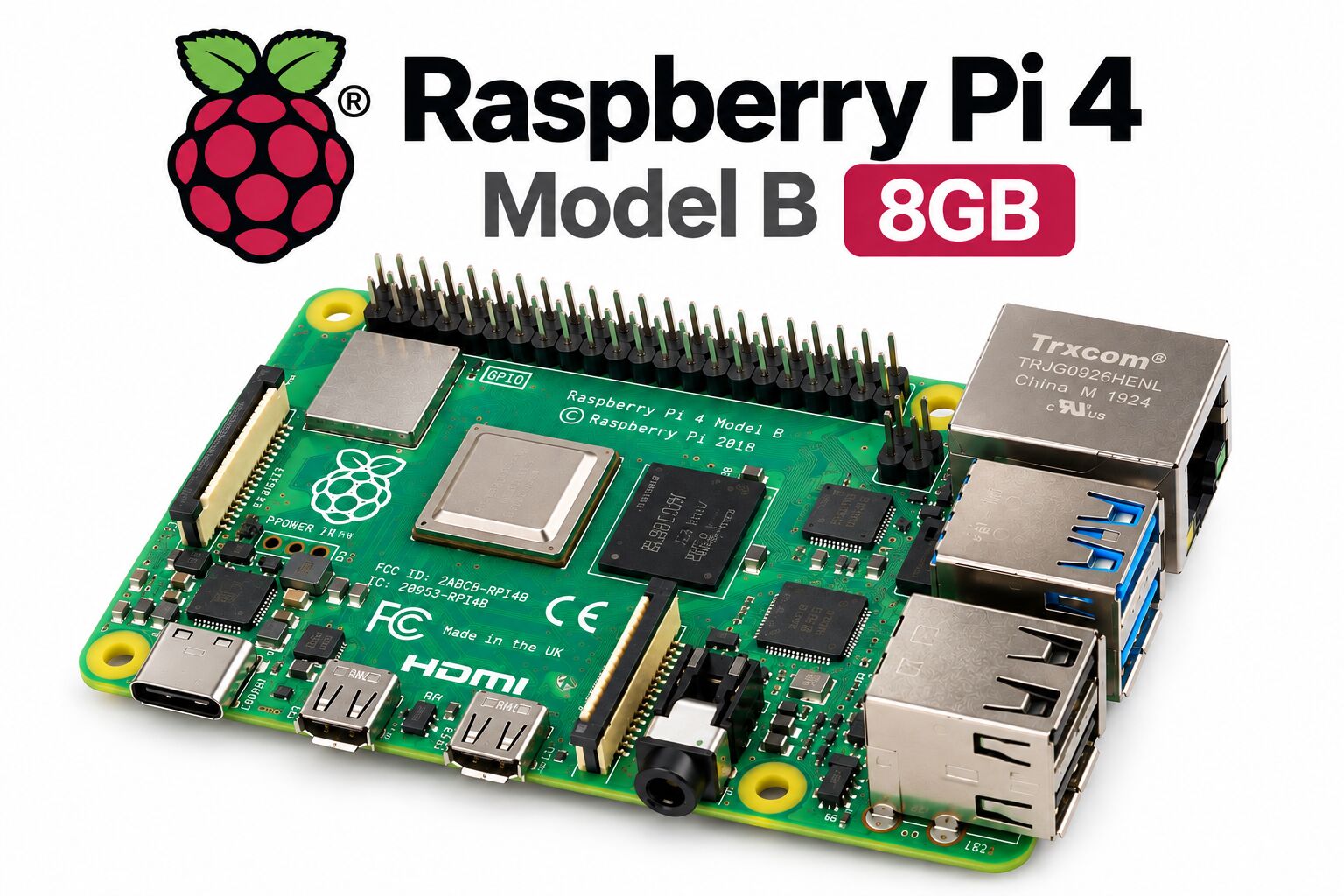
The Raspberry Pi 4 Model B 8GB is the highest-memory version of the Raspberry Pi 4 Model B family. It combines the Broadcom BCM2711 quad-core 64-bit processor with 8GB of LPDDR4 memory, Gigabit Ethernet, dual-band Wi-Fi, Bluetooth 5.0, USB 3.0 and dual micro-HDMI display outputs.
The additional RAM makes this version particularly interesting for Docker, development environments, multitasking, home servers and applications that benefit from having more memory available.
The Raspberry Pi 4 platform remains in production, with Raspberry Pi stating that the Model B will remain available until at least January 2034.
Raspberry Pi 4 Model B 8GB Specifications
| Specification | Raspberry Pi 4 Model B 8GB |
|---|---|
| SoC | Broadcom BCM2711 |
| CPU | Quad-core Cortex-A72 64-bit ARM |
| CPU speed | Up to 1.8GHz |
| GPU | VideoCore VI |
| RAM | 8GB LPDDR4-3200 |
| Wi-Fi | Dual-band 2.4GHz / 5GHz 802.11ac |
| Bluetooth | Bluetooth 5.0 + BLE |
| Ethernet | Gigabit Ethernet |
| USB | 2 × USB 3.0 + 2 × USB 2.0 |
| Video output | 2 × micro-HDMI |
| Display support | Up to 4Kp60 |
| Storage | microSD |
| GPIO | 40-pin |
| Camera | 2-lane MIPI CSI |
| Display | 2-lane MIPI DSI |
| Audio | 4-pole stereo audio/composite |
| Power | USB-C, 5V/3A minimum |
| PoE | Yes, with separate PoE HAT |
| Operating temperature | 0–50°C |
These specifications are based on Raspberry Pi’s current documentation for the Raspberry Pi 4 Model B.
Broadcom BCM2711 Processor
The Raspberry Pi 4 Model B 8GB uses the Broadcom BCM2711, a quad-core 64-bit ARM processor based on Cortex-A72.
Raspberry Pi specifies the BCM2711 at up to 1.8GHz for the Raspberry Pi 4.
The processor provides enough performance for a wide range of applications, including:
- Linux desktop computing
- Web servers
- Docker
- Home servers
- Programming
- Network services
- Home automation
- File servers
- Media applications
- Retro gaming
- Electronics projects
The 8GB version does not have a faster CPU than the 2GB or 4GB models. Its main advantage is the significantly larger memory capacity.
8GB LPDDR4 RAM
The biggest reason to choose this version is its 8GB of LPDDR4 memory.
The Raspberry Pi 4 family is available in several RAM configurations, including 1GB, 2GB, 4GB and 8GB.
Having 8GB gives the Raspberry Pi considerably more memory headroom for applications such as:
- Docker
- Software development
- Compiling large projects
- Web browsers
- Databases
- Multiple services
- Development environments
- Home servers
- Memory-intensive applications
However, 8GB does not automatically make the Raspberry Pi 4 eight times faster than the 1GB model.
CPU performance is essentially determined by the same BCM2711 platform. The additional RAM mainly prevents memory from becoming a bottleneck.
Is 8GB Too Much for a Raspberry Pi 4?
For many Raspberry Pi projects, yes.
Applications such as:
- Pi-hole
- Tailscale
- WireGuard
- Basic web servers
- Simple monitoring
- Home automation
normally don’t need anywhere close to 8GB of RAM.
For those projects, the 2GB or 4GB Raspberry Pi 4 can often provide better value.
The 8GB model becomes more interesting when you want to run multiple services simultaneously or use the Raspberry Pi as a more general-purpose Linux computer.
Dual-Band Wi-Fi
The Raspberry Pi 4 Model B 8GB includes dual-band 2.4GHz and 5GHz 802.11ac Wi-Fi.
It also includes Bluetooth 5.0 and Bluetooth Low Energy.
This allows the board to connect directly to wireless networks and peripherals without requiring additional adapters.
For server applications, however, Gigabit Ethernet is generally preferable when a wired network connection is available.
Gigabit Ethernet
The Raspberry Pi 4 includes Gigabit Ethernet.
This makes the 8GB model particularly useful for server applications involving network storage, containers or multiple network services.
Potential applications include:
- NAS
- File server
- Docker host
- VPN server
- Web server
- Home automation
- Network monitoring
- Media server
The combination of Gigabit Ethernet and USB 3.0 also makes the Raspberry Pi 4 a useful platform for external storage.
USB 3.0 and USB 2.0
The Raspberry Pi 4 Model B 8GB has four USB ports:
- 2 × USB 3.0
- 2 × USB 2.0
The USB 3.0 ports can be used for high-speed peripherals and external storage.
For example:
Raspberry Pi 4 8GB
       │
    USB 3.0
       │
      SSD
This is a popular configuration for home servers.
An external SSD can provide considerably better storage performance than relying exclusively on a microSD card.
Dual 4K Displays
The Raspberry Pi 4 includes two micro-HDMI ports.
It can drive two displays and supports resolutions up to 4Kp60 under supported configurations.
This makes it suitable for:
- Desktop computing
- Programming
- Monitoring dashboards
- Digital signage
- Kiosks
- Office applications
The two-display capability is one of the major improvements introduced with the Raspberry Pi 4 generation.
Video and Graphics
The Raspberry Pi 4 uses the VideoCore VI GPU.
Its multimedia capabilities include:
- H.265 4Kp60 decoding
- H.264 1080p60 decoding
- H.264 1080p30 encoding
- OpenGL ES graphics
- Vulkan support in the current specification
The GPU is adequate for desktop graphics, media playback and many retro gaming applications.
It is not comparable to the dedicated GPUs found in modern desktop computers.
Storage
The Raspberry Pi 4 uses a microSD card slot for operating system and storage.
You can use a microSD card for:
- Raspberry Pi OS
- Applications
- Configuration
- Documents
- Databases
- Projects
For a server, however, an external SSD is generally a more attractive option.
A typical configuration is:
          Raspberry Pi 4 8GB
                  │
             USB 3.0
                  │
                SSD
                  │
             Gigabit LAN
                  │
               Network
Unlike the Raspberry Pi 5, the Raspberry Pi 4 does not provide an exposed PCIe connector for native NVMe storage.
NVMe drives can still be used through suitable USB adapters or enclosures.
40-Pin GPIO
The Raspberry Pi 4 has the standard 40-pin GPIO header used by the Raspberry Pi ecosystem.
It provides access to interfaces including:
- GPIO
- I²C
- SPI
- UART
- PWM
This makes the Raspberry Pi 4 8GB suitable for:
- Robotics
- Sensors
- Automation
- LEDs
- Displays
- Relays
- Electronics projects
The 8GB memory capacity isn’t particularly important for simple GPIO projects, but it can be useful when the project combines hardware control with more demanding software.
Camera and Display Interfaces
The Raspberry Pi 4 includes a 2-lane MIPI CSI camera interface and a 2-lane MIPI DSI display interface.
The camera interface can be used for:
- Security cameras
- Computer vision
- Robotics
- Time-lapse photography
- Streaming
- Wildlife cameras
The DSI interface supports compatible displays and touchscreen projects.
Audio and Composite Video
The Raspberry Pi 4 includes a 4-pole stereo audio and composite-video connector.
For modern displays, HDMI is generally the preferred option, but the analog connector can still be useful in specialized projects.
Power Requirements
The Raspberry Pi 4 uses a USB-C power connector.
Raspberry Pi specifies a minimum 5V/3A power supply.
A good-quality power supply is especially important when using:
- External SSDs
- USB hard drives
- Multiple USB devices
- Cameras
- Other peripherals
The Raspberry Pi 4 also supports Power over Ethernet when paired with a compatible PoE HAT.
Cooling
The Raspberry Pi 4 can become warm under sustained CPU loads.
For lightweight applications, passive cooling may be sufficient.
For continuous workloads such as:
- Docker
- Compiling software
- Gaming
- Video processing
- Server applications
a heatsink or active cooling solution can help maintain consistent performance.
The 8GB model doesn’t inherently require more cooling simply because it has more RAM, but users are more likely to deploy it in workloads where sustained performance matters.
Raspberry Pi 4 8GB as a Home Server
The 8GB Raspberry Pi 4 is particularly interesting as a small home server.
You can use it to run several services simultaneously:
                 Raspberry Pi 4 8GB
                         │
                       Linux
                         │
                      Docker
                         │
       ┌─────────────────┼─────────────────┐
       │                 │                 │
    Pi-hole          Nextcloud          Tailscale
       │                 │                 │
       └─────────────────┼─────────────────┘
                         │
                      Network
The 8GB memory gives the system significantly more headroom than the 2GB and 4GB versions.
Possible server applications include:
- Docker
- Pi-hole
- Nextcloud
- Tailscale
- WireGuard
- Jellyfin
- Web servers
- Home Assistant
- File sharing
- Monitoring
The exact number of services you can run depends heavily on their individual memory and CPU requirements.
Raspberry Pi 4 8GB for Docker
Docker is one of the strongest use cases for the 8GB Raspberry Pi 4.
The additional memory allows you to run more containers before RAM becomes a limiting factor.
For example:
                 Raspberry Pi 4 8GB
                         │
                       Docker
                         │
       ┌─────────┬───────┼────────┬─────────┐
       │         │       │        │         │
   Pi-hole   Web App  Database  Tailscale  Proxy
The 8GB configuration is particularly useful when containers include applications with larger memory requirements.
However, CPU performance remains that of the Raspberry Pi 4 platform. More RAM does not eliminate CPU limitations.
Raspberry Pi 4 8GB for Nextcloud
The 8GB version can be a useful platform for a small Nextcloud installation.
The additional RAM is helpful when running Nextcloud alongside other services.
For example:
- Nextcloud
- MariaDB/PostgreSQL
- Redis
- Reverse proxy
- Tailscale
can potentially be deployed on the same machine.
For a large number of users or heavy file-processing workloads, a more powerful server is recommended.
Raspberry Pi 4 8GB for Jellyfin
The Raspberry Pi 4 can function as a lightweight Jellyfin server.
It is most suitable when clients can directly play the stored media files.
Heavy video transcoding is much more demanding.
If you expect multiple simultaneous transcoding sessions, a Raspberry Pi 5 or a more powerful x86 server is generally a better choice.
The 8GB model can provide more memory for the overall media-server environment, but it does not turn the Raspberry Pi 4 into a high-performance transcoding server.
Raspberry Pi 4 8GB for Desktop Computing
The 8GB version is the most comfortable Raspberry Pi 4 configuration for desktop multitasking.
The extra memory can be useful for:
- Web browsing
- Programming
- IDEs
- Office applications
- Multiple applications
- Development environments
Raspberry Pi designed the Raspberry Pi 4 to provide a more complete desktop experience, including web browsing, document editing, spreadsheets and presentations.
However, the Raspberry Pi 5 offers substantially higher CPU performance and is the better choice for demanding desktop workloads.
Raspberry Pi 4 8GB for Retro Gaming
The Raspberry Pi 4 8GB can be used for retro gaming, but the extra memory provides little benefit for most emulators.
Gaming performance is primarily constrained by CPU and GPU performance rather than RAM capacity.
Therefore, a 4GB Raspberry Pi 4 can deliver very similar gaming performance to the 8GB version.
If your primary purpose is retro gaming, buying the 8GB model purely for the additional RAM generally doesn’t make sense.
Raspberry Pi 4 8GB vs 4GB
The 8GB and 4GB models use the same basic processor and platform.
| Feature | Raspberry Pi 4 4GB | Raspberry Pi 4 8GB |
|---|---|---|
| SoC | BCM2711 | BCM2711 |
| CPU | 4 × Cortex-A72 | 4 × Cortex-A72 |
| CPU speed | Up to 1.8GHz | Up to 1.8GHz |
| RAM | 4GB LPDDR4 | 8GB LPDDR4 |
| Ethernet | Gigabit | Gigabit |
| USB 3.0 | 2 | 2 |
| Wi-Fi | Dual-band | Dual-band |
| Bluetooth | 5.0 | 5.0 |
| GPIO | 40-pin | 40-pin |
| Storage | microSD / USB | microSD / USB |
The primary difference is RAM capacity.
If an application doesn’t need more than 4GB, the 8GB model won’t provide a significant performance advantage.
Raspberry Pi 4 8GB vs Raspberry Pi 5
The Raspberry Pi 5 is considerably faster than the Raspberry Pi 4.
| Feature | Raspberry Pi 4 8GB | Raspberry Pi 5 |
|---|---|---|
| SoC | BCM2711 | BCM2712 |
| CPU architecture | Cortex-A72 | Cortex-A76 |
| CPU cores | 4 | 4 |
| RAM options | Up to 8GB | Up to 16GB |
| Ethernet | Gigabit | Gigabit |
| USB 3 | 2 | 2 |
| Wi-Fi | 802.11ac | 802.11ac |
| GPIO | 40-pin | 40-pin |
| PCIe | No | Yes |
| NVMe | USB adapter | PCIe-based solutions |
| Performance | Good | Much higher |
If you’re purchasing hardware for a demanding new project, the Raspberry Pi 5 is generally the better choice.
The Raspberry Pi 4 8GB makes more sense when:
- You already have Raspberry Pi 4 hardware
- The project doesn’t need high CPU performance
- You find the 8GB model at an attractive price
- You need a low-power server
- Your workload benefits from RAM but isn’t CPU-intensive
Who Should Buy the Raspberry Pi 4 Model B 8GB?
The 8GB model makes the most sense for users who want to run:
- Multiple Docker containers
- Development environments
- Home servers
- Nextcloud
- Databases
- Multiple network services
- Desktop applications
- Programming tools
- Self-hosted applications
It is less compelling for simple projects such as:
- Pi-hole
- Basic VPN
- Simple GPIO projects
- Basic Tailscale nodes
- Simple network monitoring
For those applications, a lower-memory Raspberry Pi can be more cost-effective.
Raspberry Pi 4 Model B 8GB Pros and Cons
Pros
- 8GB LPDDR4 RAM
- Quad-core 64-bit CPU
- Gigabit Ethernet
- Dual-band Wi-Fi
- Bluetooth 5.0
- 2 × USB 3.0
- 2 × USB 2.0
- Dual-display support
- Up to 4K display output
- 40-pin GPIO
- Camera and display interfaces
- Excellent software ecosystem
- Large accessory ecosystem
- USB-C power
- PoE support with compatible HAT
- Long production lifetime
Cons
- CPU is considerably slower than Raspberry Pi 5
- 8GB can be unnecessary for many Raspberry Pi projects
- No native M.2 NVMe connector
- micro-HDMI requires suitable cables
- Sustained workloads benefit from cooling
- USB-connected storage is less direct than PCIe NVMe
Is the Raspberry Pi 4 Model B 8GB Worth It?
The answer depends heavily on the workload.
If you’re building a simple Pi-hole server, 8GB is unnecessary.
If you’re building a Docker server with numerous containers, the extra RAM can be useful.
The 8GB model is also attractive if the Raspberry Pi will serve as a general-purpose Linux computer where multiple applications are open simultaneously.
The important distinction is that 8GB improves memory capacity rather than CPU performance.
If your application is CPU-bound, moving from a 4GB Raspberry Pi 4 to an 8GB Raspberry Pi 4 won’t provide the same benefit as moving to a Raspberry Pi 5.
Raspberry Pi 4 Model B 8GB: Final Verdict
The Raspberry Pi 4 Model B 8GB is the highest-memory version of the Raspberry Pi 4 family and is best suited to users who actually need additional RAM.
Its combination of 8GB LPDDR4 memory, Gigabit Ethernet, USB 3.0, Wi-Fi, Bluetooth and the Raspberry Pi software ecosystem makes it a capable platform for home servers, Docker and development.
However, the extra RAM doesn’t change the underlying CPU performance.
For simple projects, the 2GB or 4GB versions can provide better value. For demanding new projects, the Raspberry Pi 5 is generally the more capable platform.
Rating
| Category | Rating |
|---|---|
| Performance | 4/5 |
| Connectivity | 5/5 |
| Expansion | 5/5 |
| Software ecosystem | 5/5 |
| Server capabilities | 5/5 |
| Value | 4/5 |
| Overall | 4.5/5 |
Best for: Docker, home servers, development, self-hosting, multitasking and applications that benefit from additional RAM.
Not ideal for: Projects that don’t use much memory, demanding CPU workloads, heavy transcoding or applications requiring native NVMe performance.
Frequently Asked Questions
How much RAM does the Raspberry Pi 4 Model B 8GB have?
The Raspberry Pi 4 Model B 8GB has 8GB of LPDDR4 memory.
Is the Raspberry Pi 4 8GB faster than the 4GB model?
Not significantly in CPU-bound workloads. Both use the BCM2711 processor. The 8GB model provides twice as much RAM, which can improve performance when applications would otherwise run short of memory.
Is 8GB enough for Docker?
Yes. 8GB provides substantial memory headroom for a Raspberry Pi Docker host, although CPU performance and storage can still become bottlenecks.
Can Raspberry Pi 4 8GB run Nextcloud?
Yes. The 8GB model is well suited to a small self-hosted Nextcloud installation, especially when combined with an external SSD.
Can Raspberry Pi 4 8GB run Pi-hole?
Yes, but 8GB is considerably more memory than Pi-hole normally requires.
Can Raspberry Pi 4 8GB run Jellyfin?
Yes. It works best when media can be directly played by clients. Heavy transcoding is not the Raspberry Pi 4’s strongest use case.
Does Raspberry Pi 4 8GB support NVMe?
It does not have a native M.2 NVMe connector. NVMe storage can be attached using a suitable USB adapter or enclosure.
How many USB ports does the Raspberry Pi 4 have?
There are four USB ports: two USB 3.0 and two USB 2.0.
Can the Raspberry Pi 4 8GB run two monitors?
Yes. The board has two micro-HDMI ports and supports dual displays.
Can Raspberry Pi 4 8GB run 4K video?
Yes. The Raspberry Pi 4 supports 4Kp60 H.265 decoding and display output up to 4Kp60 under supported configurations.
Is Raspberry Pi 4 8GB better than Raspberry Pi 5?
Not generally. The Raspberry Pi 5 has a much faster processor and newer I/O capabilities. The Raspberry Pi 4 8GB’s main advantage is its 8GB memory configuration and potentially lower cost.