CPU: Broadcom BCM2837B0, Cortex-A53 1400 MHz | 4 Cores | ARMv8
RAM: 1024 MB LPDDR2
Ethernet Interfaces Qty: 1
Gigabit Ethernet: Yes
USB Ports Qty: 4
USB 3.0: No
Wi-Fi+BT: Yes
Wi-Fi 6: No
NVMe Port: No
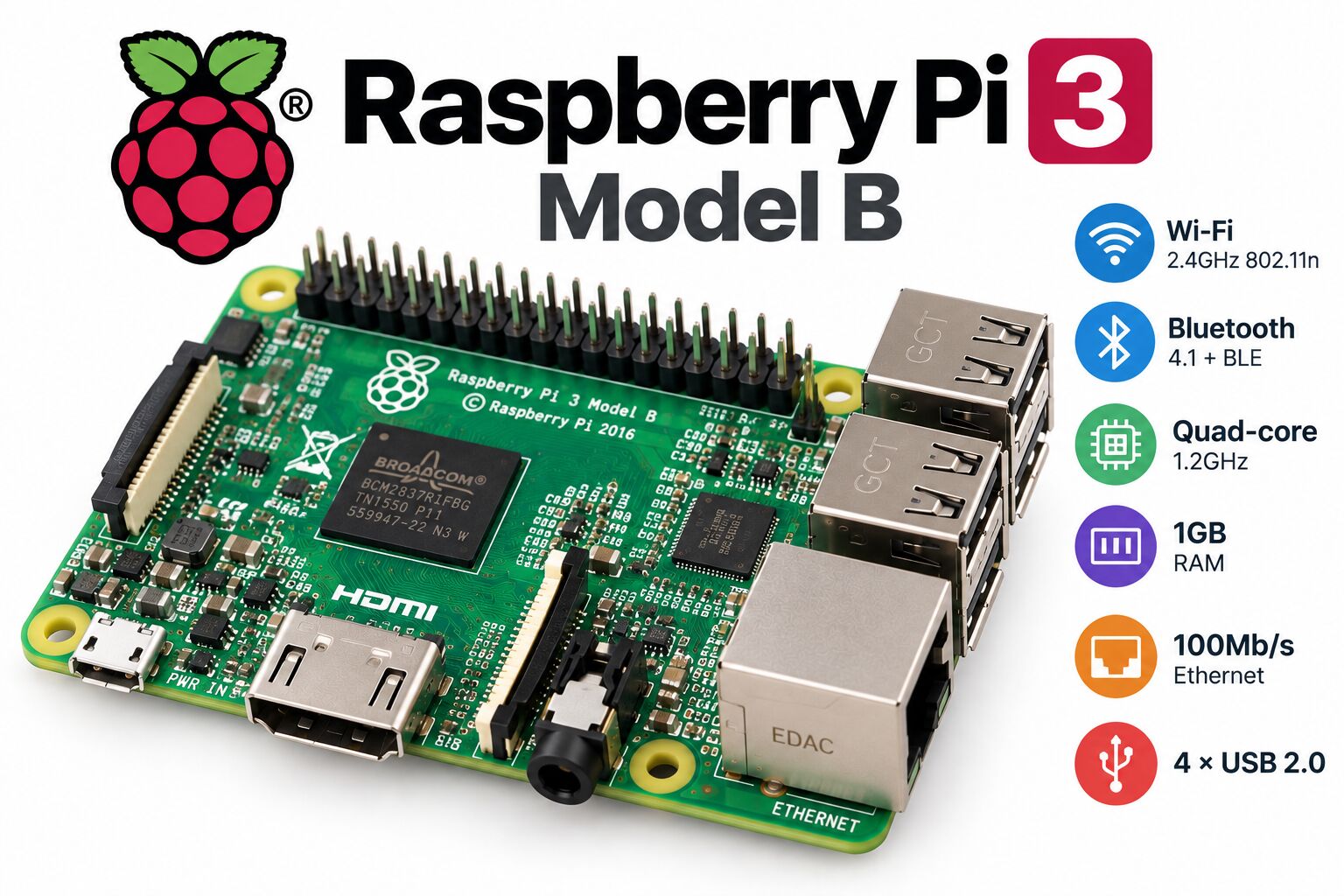
The Raspberry Pi 3 Model B is a compact single-board computer built around a quad-core 64-bit ARM processor, 1GB of RAM, 2.4GHz Wi-Fi, Bluetooth 4.1, Gigabit Ethernet-compatible USB networking, four USB ports, HDMI, and the standard 40-pin GPIO header.
Released as the successor to the Raspberry Pi 2 Model B, the Raspberry Pi 3 Model B was an important step for the Raspberry Pi platform because it introduced built-in wireless networking and Bluetooth while retaining the same general-purpose 40-pin GPIO and compact form factor. Raspberry Pi’s documentation lists the original Raspberry Pi 3 Model B with the BCM2837 SoC, 1GB RAM, 2.4GHz 802.11n Wi-Fi, Bluetooth 4.1/BLE, 100Mb/s Ethernet, and four USB 2.0 ports.
It is considerably older and slower than the Raspberry Pi 4 and Raspberry Pi 5, but it can still be useful for lightweight Linux servers, networking projects, home automation, programming, retro gaming, and Raspberry Pi projects that don’t require modern CPU performance.
Raspberry Pi 3 Model B Specifications
| Specification | Raspberry Pi 3 Model B |
|---|---|
| SoC | Broadcom BCM2837 |
| CPU | Quad-core ARM Cortex-A53 64-bit |
| CPU speed | 1.2GHz |
| GPU | VideoCore IV |
| RAM | 1GB LPDDR2 |
| Wi-Fi | 2.4GHz 802.11n |
| Wi-Fi throughput | Up to 35Mb/s |
| Bluetooth | Bluetooth 4.1 + BLE |
| Ethernet | 10/100Mb/s |
| USB | 4 × USB 2.0 |
| Video output | Full-size HDMI |
| Audio | 3.5mm 4-pole audio/composite |
| Storage | microSD |
| GPIO | 40-pin |
| Camera | MIPI CSI |
| Display | MIPI DSI |
| Power | 5V via micro-USB |
| Form factor | 85 × 56mm |
Raspberry Pi’s official documentation identifies the Raspberry Pi 3 Model B with the BCM2837 processor, 1GB memory, 2.4GHz single-band 802.11n wireless networking, Bluetooth 4.1/BLE, 100Mb/s Ethernet, four USB 2.0 ports, HDMI, CSI, DSI, and microSD storage.
Broadcom BCM2837 Processor
The Raspberry Pi 3 Model B uses the Broadcom BCM2837, a quad-core 64-bit ARM SoC.
The four ARM Cortex-A53 cores operate at 1.2GHz. The processor represented a major performance improvement over the original Raspberry Pi generation and provided 64-bit ARM support to the Raspberry Pi family.
The CPU is suitable for lightweight applications such as:
- Linux servers
- Web servers
- Network services
- Programming
- Home automation
- Lightweight Docker workloads
- Retro gaming
- GPIO projects
- Basic desktop computing
However, the 1.2GHz Cortex-A53 processor is now quite modest compared with the Cortex-A72 CPU in the Raspberry Pi 4 and Cortex-A76 processor in the Raspberry Pi 5.
1GB RAM
The Raspberry Pi 3 Model B has 1GB of LPDDR2 memory.
Unlike later Raspberry Pi models, there are no different RAM configurations for the standard Raspberry Pi 3 Model B.
The 1GB capacity is adequate for lightweight operating systems and services but can become a limitation when running multiple applications simultaneously.
It is suitable for:
- Pi-hole
- Tailscale
- WireGuard
- Lightweight web servers
- Home automation
- Basic file sharing
- Simple monitoring
- GPIO applications
It is less suitable for:
- Large databases
- Multiple heavy Docker containers
- Modern desktop multitasking
- Large Nextcloud installations
- Memory-intensive development environments
Built-In Wi-Fi
One of the most important features of the Raspberry Pi 3 Model B was the addition of built-in wireless networking.
The board supports 2.4GHz 802.11n Wi-Fi. Raspberry Pi’s documentation lists a maximum throughput of approximately 35Mb/s for the wireless connection.
This means you don’t need an external USB Wi-Fi adapter for most projects.
The wireless connection is useful for:
- IoT projects
- Home automation
- Remote administration
- Wireless sensors
- Small web servers
- Network monitoring
- Raspberry Pi robots
- Smart-home projects
The major limitation is that the Raspberry Pi 3 Model B supports 2.4GHz Wi-Fi only. The later Raspberry Pi 3 Model B+ added dual-band 2.4GHz/5GHz 802.11ac Wi-Fi.
Bluetooth 4.1
The Raspberry Pi 3 Model B also introduced integrated Bluetooth 4.1 with Bluetooth Low Energy support.
This allows the board to communicate with Bluetooth devices without an additional USB adapter.
Potential applications include:
- Bluetooth sensors
- Wireless keyboards
- Mice
- Game controllers
- IoT devices
- Bluetooth beacons
- Home automation
Bluetooth support was a major improvement over earlier Raspberry Pi models.
10/100 Ethernet
The Raspberry Pi 3 Model B includes an Ethernet port, but unlike the Raspberry Pi 4, it does not provide Gigabit Ethernet.
The official documentation lists 100Mb/s Ethernet.
This is sufficient for many lightweight applications:
- Pi-hole
- VPN
- Web servers
- Home automation
- Remote administration
- Network monitoring
However, it becomes a significant limitation for:
- NAS applications
- Large file transfers
- High-bandwidth media servers
- Network storage
- Heavy server workloads
The Raspberry Pi 3 Model B+ improved this by offering Gigabit Ethernet over USB 2.0, with a maximum throughput of approximately 300Mb/s.
Four USB 2.0 Ports
The Raspberry Pi 3 Model B provides four USB 2.0 ports.
This allows you to connect several peripherals without requiring a USB hub.
Common peripherals include:
- Keyboard
- Mouse
- USB storage
- Game controllers
- USB Ethernet adapters
- USB Wi-Fi adapters
- Cameras
- Other USB accessories
There are no USB 3.0 ports, which limits external storage performance compared with the Raspberry Pi 4 and newer models.
Full-Size HDMI
Unlike newer Raspberry Pi boards that use micro-HDMI, the Raspberry Pi 3 Model B includes a full-size HDMI port.
This simplifies connection to:
- TVs
- Computer monitors
- Projectors
- Digital signage
The HDMI output is useful for desktop computing, media playback, retro gaming, and kiosk projects.
Video and Graphics
The Raspberry Pi 3 Model B uses the VideoCore IV GPU.
Its multimedia hardware supports H.264 and MPEG-4 video decoding at up to 1080p30, H.264 encoding at 1080p30, and OpenGL ES graphics.
This makes the Raspberry Pi 3 suitable for basic multimedia applications.
It is not a good choice for demanding modern video workloads.
For example, if your project requires multiple high-resolution video streams or heavy transcoding, a Raspberry Pi 4, Raspberry Pi 5, or a more powerful computer is a better option.
Raspberry Pi 3 Storage
The Raspberry Pi 3 Model B uses a microSD card as its primary storage.
The microSD card can contain:
- Operating system
- Applications
- Configuration files
- Documents
- Databases
- Project files
The lack of USB 3.0 means that external storage performance is significantly more limited than on the Raspberry Pi 4.
For lightweight projects, however, a good-quality microSD card remains sufficient.
40-Pin GPIO Header
The Raspberry Pi 3 Model B includes the standard 40-pin GPIO header used by the Raspberry Pi ecosystem.
The GPIO header provides interfaces such as:
- GPIO
- I²C
- SPI
- UART
- PWM
This makes the Raspberry Pi 3 useful for hardware projects involving:
- Sensors
- LEDs
- Buttons
- Relays
- Displays
- Motors
- Robotics
- Automation
A major advantage of the Raspberry Pi 3 is compatibility with a large ecosystem of existing Raspberry Pi HATs and accessories.
Camera Interface
The board includes a MIPI CSI camera interface.
This allows compatible Raspberry Pi camera modules to be connected directly to the board.
Possible projects include:
- Security cameras
- Time-lapse cameras
- Wildlife cameras
- Computer vision
- Robotics
- Motion detection
- Streaming
- Home automation
The Raspberry Pi 3’s CPU and memory limitations should be considered when running more demanding computer-vision workloads.
Display Interface
The Raspberry Pi 3 Model B also includes a MIPI DSI display interface.
This can be used with compatible Raspberry Pi displays and touchscreen hardware.
It makes the board suitable for embedded projects such as:
- Touchscreen dashboards
- Home automation controllers
- Kiosks
- Information displays
- Custom interfaces
Audio and Composite Video
The Raspberry Pi 3 Model B includes a 4-pole 3.5mm audio/video connector.
This provides analog stereo audio and composite video capabilities.
For modern applications, HDMI is generally preferable for video, but the analog output can be useful for older equipment and specialized projects.
Power Requirements
The Raspberry Pi 3 Model B uses micro-USB power.
A quality 5V power supply is recommended for stable operation.
The board’s lower power requirements make it attractive for projects where energy consumption matters.
For example, it can be used for:
- Always-on network services
- Home automation
- Monitoring systems
- IoT gateways
- Small servers
Raspberry Pi 3 Model B for Home Servers
The Raspberry Pi 3 Model B can still be used as a small home server, particularly for lightweight applications.
Its main advantages are:
- Low power consumption
- Built-in Ethernet
- Built-in Wi-Fi
- 1GB RAM
- Four USB ports
- Large Raspberry Pi software ecosystem
Suitable server projects include:
- Pi-hole
- Tailscale
- WireGuard
- Lightweight web servers
- DNS servers
- Monitoring
- Home automation
- Small file-sharing services
However, the 100Mb/s Ethernet connection and 1GB RAM limit its usefulness for demanding server applications.
Raspberry Pi 3 Model B for Pi-hole
Pi-hole is one of the best use cases for an older Raspberry Pi 3 Model B.
Pi-hole does not require significant CPU or RAM resources, so the board has enough performance for this application.
The Raspberry Pi 3 can run Pi-hole continuously while consuming relatively little power.
It can also run other lightweight networking services alongside Pi-hole, depending on the configuration.
For a dedicated ad-blocking DNS server, the Raspberry Pi 3 Model B remains a practical option.
Raspberry Pi 3 Model B for Tailscale
The Raspberry Pi 3 Model B can also be used as a Tailscale node.
The relatively low resource requirements of Tailscale make the board suitable for:
- Remote access
- Secure connections between devices
- Access to home services
- Remote administration
For a simple Tailscale installation, the 1GB RAM capacity is generally not a significant limitation.
Raspberry Pi 3 Model B for WireGuard
The Raspberry Pi 3 can be configured as a WireGuard VPN server.
It is particularly appropriate for relatively small home networks.
However, VPN throughput depends on several factors, including:
- CPU performance
- Encryption workload
- Internet connection
- Ethernet performance
- Network configuration
The 100Mb/s Ethernet interface places a practical limit on network throughput compared with newer Raspberry Pi models.
Raspberry Pi 3 Model B for Docker
Docker can run on the Raspberry Pi 3 Model B, but the 1GB RAM limitation means you should keep your container stack lightweight.
Good candidates include:
- Nginx
- Pi-hole
- Tailscale
- Lightweight web applications
- Small monitoring services
Large applications with databases and multiple dependencies can quickly consume the available memory.
For a new Docker server, a Raspberry Pi 4 or Raspberry Pi 5 is generally a much better choice.
Raspberry Pi 3 Model B for Jellyfin
The Raspberry Pi 3 Model B can be used for lightweight media-server experiments, but it isn’t an ideal Jellyfin server.
The main limitations are:
- 1GB RAM
- Older CPU
- Video-processing limitations
- 100Mb/s Ethernet
- USB 2.0 storage
It is best suited to situations where media can be direct played by the client.
For a more capable Jellyfin server, the Raspberry Pi 4 or Raspberry Pi 5 is a better choice.
Raspberry Pi 3 Model B for Retro Gaming
Retro gaming is another reasonable application for the Raspberry Pi 3 Model B.
The board can emulate many older gaming platforms and can be used with popular Raspberry Pi-compatible retro-gaming software.
It is particularly appropriate for:
- Classic arcade games
- Older console systems
- DIY arcade cabinets
- Retro gaming stations
More demanding systems may not perform well.
If emulation performance is a priority, newer Raspberry Pi hardware provides a substantial improvement.
Raspberry Pi 3 Model B for Desktop Computing
The Raspberry Pi 3 Model B can run a Linux desktop, but it is no longer a particularly powerful desktop computer.
The 1GB RAM capacity can become restrictive with:
- Modern web browsers
- Multiple browser tabs
- Office applications
- Development tools
- Large graphical applications
It is better suited to lightweight desktop environments and basic computing tasks.
For regular desktop use, the Raspberry Pi 4 or Raspberry Pi 5 is considerably better.
Raspberry Pi 3 Model B vs Raspberry Pi 3 Model B+
The Raspberry Pi 3 Model B and Raspberry Pi 3 Model B+ are easy to confuse, but they are different products.
| Feature | Raspberry Pi 3 Model B | Raspberry Pi 3 Model B+ |
|---|---|---|
| SoC | BCM2837 | BCM2837B0 |
| CPU | 4 × Cortex-A53 | 4 × Cortex-A53 |
| CPU speed | 1.2GHz | 1.4GHz |
| RAM | 1GB | 1GB |
| Wi-Fi | 2.4GHz 802.11n | 2.4/5GHz 802.11ac |
| Bluetooth | 4.1 + BLE | 4.2 + BLE |
| Ethernet | 100Mb/s | Gigabit over USB 2.0 |
| USB | 4 × USB 2.0 | 4 × USB 2.0 |
| GPIO | 40-pin | 40-pin |
| Storage | microSD | microSD |
| Power | micro-USB | micro-USB |
| PoE | No | Yes, with PoE HAT |
The Raspberry Pi 3 Model B+ is the faster and more capable revision. Raspberry Pi describes it as the final revision of the third-generation Raspberry Pi family.
If you’re buying between the two today and the price difference is small, the 3 Model B+ is generally the better choice.
Raspberry Pi 3 Model B vs Raspberry Pi 4
The jump from Raspberry Pi 3 Model B to Raspberry Pi 4 is substantial.
| Feature | Raspberry Pi 3 Model B | Raspberry Pi 4 Model B |
|---|---|---|
| SoC | BCM2837 | BCM2711 |
| CPU | 4 × Cortex-A53 | 4 × Cortex-A72 |
| CPU speed | 1.2GHz | Up to 1.8GHz |
| RAM | 1GB | Up to 8GB |
| Ethernet | 100Mb/s | Gigabit |
| USB | 4 × USB 2.0 | 2 × USB 2.0 + 2 × USB 3.0 |
| Wi-Fi | 2.4GHz | 2.4GHz + 5GHz |
| Bluetooth | 4.1 | 5.0 |
| Video | Full HDMI | 2 × micro-HDMI |
| Storage | microSD | microSD + USB storage |
| Power | micro-USB | USB-C |
The Raspberry Pi 4 is dramatically better suited to server, desktop, storage and development workloads.
The Raspberry Pi 3 Model B remains interesting primarily when you need inexpensive hardware for a lightweight project.
Who Should Buy the Raspberry Pi 3 Model B?
The Raspberry Pi 3 Model B makes the most sense for users who already have one or can obtain one inexpensively.
Good applications include:
- Pi-hole
- Tailscale
- WireGuard
- Home automation
- Lightweight web servers
- IoT gateways
- GPIO projects
- Sensors
- Robotics
- Retro gaming
- Basic network monitoring
It is not the best choice for:
- Modern desktop computing
- NAS applications
- Heavy Docker stacks
- Large databases
- Modern AI applications
- Heavy video transcoding
- High-performance servers
Raspberry Pi 3 Model B Pros and Cons
Pros
- Quad-core 64-bit CPU
- 1GB RAM
- Built-in Wi-Fi
- Built-in Bluetooth
- Ethernet
- Four USB ports
- Full-size HDMI
- 40-pin GPIO
- Camera interface
- Display interface
- Very large software ecosystem
- Low power consumption
- Compact form factor
- Compatible with many Raspberry Pi accessories
Cons
- Only 1GB RAM
- 1.2GHz CPU
- 2.4GHz Wi-Fi only
- 100Mb/s Ethernet
- No USB 3.0
- Older VideoCore IV GPU
- microSD is the primary storage option
- Limited for modern desktop applications
- Significantly slower than Raspberry Pi 4 and Raspberry Pi 5
Is the Raspberry Pi 3 Model B Still Worth It?
The Raspberry Pi 3 Model B is still useful, but mainly for lightweight projects or when you already own the board.
Its built-in Wi-Fi, Bluetooth, Ethernet and 40-pin GPIO make it much more versatile than many inexpensive older SBCs.
For projects such as Pi-hole, Tailscale, basic home automation and simple network services, its hardware can still be sufficient.
However, if you’re purchasing a Raspberry Pi specifically for a new project, newer hardware is usually preferable.
The Raspberry Pi 4 provides a much faster CPU, more RAM options, USB 3.0, Gigabit Ethernet and dual-band Wi-Fi. The Raspberry Pi 5 goes considerably further with a much faster CPU and newer I/O.
Raspberry Pi 3 Model B: Final Verdict
The Raspberry Pi 3 Model B is an older but still capable single-board computer for lightweight applications.
Its biggest strengths are the quad-core 64-bit CPU, built-in 2.4GHz Wi-Fi, Bluetooth 4.1, Ethernet, four USB ports and 40-pin GPIO header.
For simple network services and electronics projects, the Raspberry Pi 3 Model B can still do the job.
For more demanding applications, however, its 1GB RAM, 100Mb/s Ethernet, USB 2.0 and older Cortex-A53 processor are significant limitations.
Rating
| Category | Rating |
|---|---|
| Performance | 3/5 |
| Connectivity | 3.5/5 |
| Expansion | 4/5 |
| Software ecosystem | 5/5 |
| Server capabilities | 3/5 |
| Value | 4/5 |
| Overall | 3.5/5 |
Best for: Pi-hole, Tailscale, WireGuard, home automation, GPIO projects, IoT and retro gaming.
Not ideal for: NAS, modern desktop computing, heavy Docker workloads, media transcoding and demanding server applications.
Frequently Asked Questions
How much RAM does the Raspberry Pi 3 Model B have?
The Raspberry Pi 3 Model B has 1GB of LPDDR2 RAM.
What processor does the Raspberry Pi 3 Model B use?
It uses the Broadcom BCM2837, with four ARM Cortex-A53 cores running at 1.2GHz.
Does the Raspberry Pi 3 Model B have Wi-Fi?
Yes. It includes 2.4GHz 802.11n Wi-Fi.
Does the Raspberry Pi 3 Model B have Bluetooth?
Yes. It supports Bluetooth 4.1 and Bluetooth Low Energy.
Does Raspberry Pi 3 Model B have Gigabit Ethernet?
No. The original Raspberry Pi 3 Model B has 100Mb/s Ethernet. The Raspberry Pi 3 Model B+ introduced faster Gigabit Ethernet over USB 2.0.
How many USB ports does the Raspberry Pi 3 Model B have?
It has four USB 2.0 ports.
Can Raspberry Pi 3 Model B run Pi-hole?
Yes. Pi-hole is a good use case for the Raspberry Pi 3 Model B because it requires relatively few system resources.
Can Raspberry Pi 3 Model B run Docker?
Yes, but the 1GB RAM limit makes it best suited to a small number of lightweight containers.
Can Raspberry Pi 3 Model B run WireGuard?
Yes. The Raspberry Pi 3 can be used as a WireGuard VPN server or client.
Can Raspberry Pi 3 Model B run Tailscale?
Yes. Its hardware is sufficient for Tailscale and other lightweight networking applications.
Can Raspberry Pi 3 Model B run Jellyfin?
It can run Jellyfin for lightweight use, but it is not recommended for demanding transcoding workloads.
Does Raspberry Pi 3 Model B support USB 3.0?
No. All four USB ports are USB 2.0.
What storage does Raspberry Pi 3 Model B use?
The Raspberry Pi 3 Model B uses a microSD card for its operating system and primary storage.
Is Raspberry Pi 3 Model B better than Raspberry Pi 3 Model B+?
No. The Raspberry Pi 3 Model B+ has a faster 1.4GHz processor, dual-band Wi-Fi, Bluetooth 4.2 and faster Ethernet.
Is Raspberry Pi 3 Model B still good for a server?
It can be a good server for lightweight applications such as Pi-hole, Tailscale, WireGuard and simple web services. For heavier workloads, Raspberry Pi 4 or Raspberry Pi 5 is a better choice.