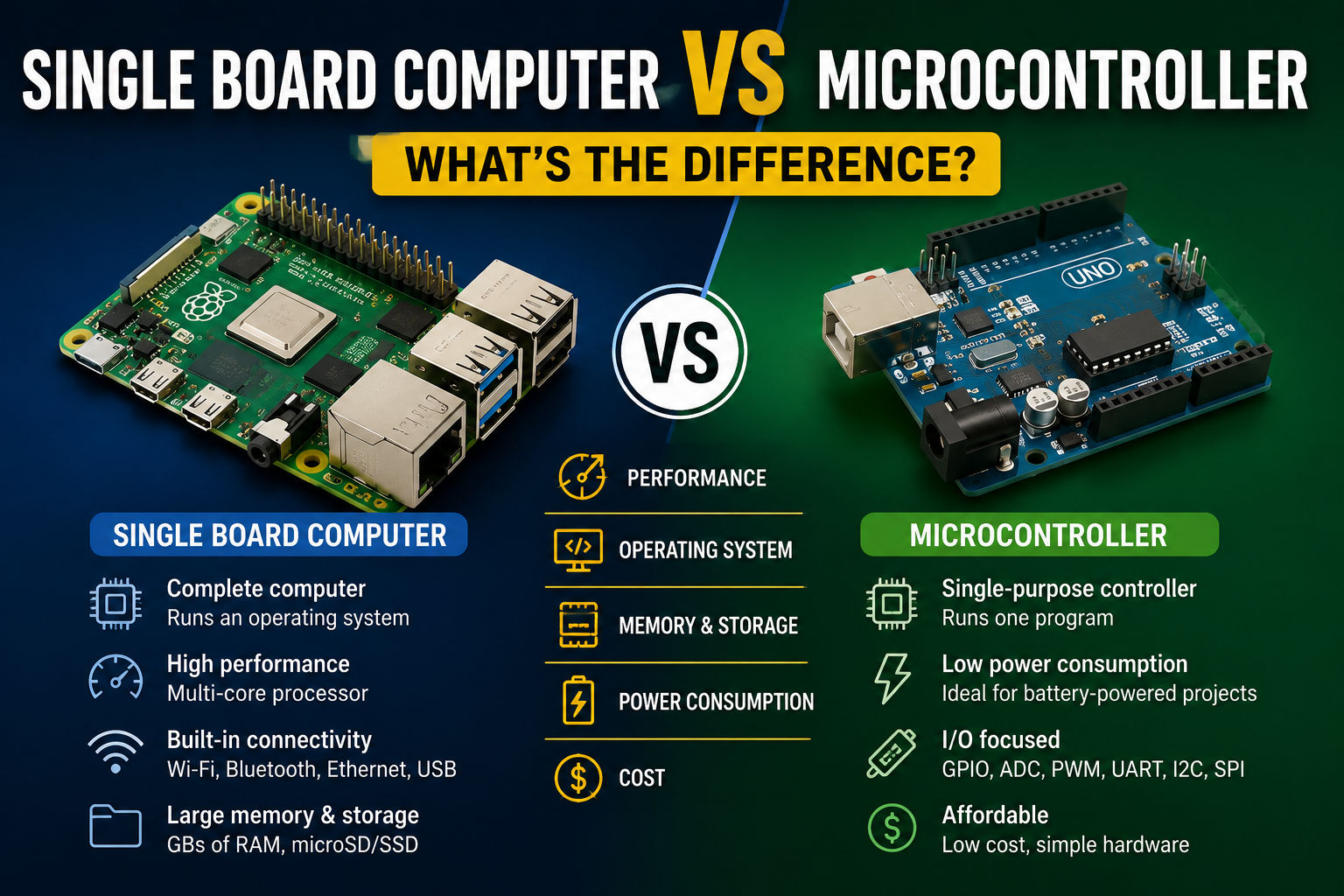
If you’re starting a DIY electronics or embedded systems project, you’ve probably come across two common terms: single board computer (SBC) and microcontroller (MCU). While they may look similar at first glance, they are designed for very different purposes.
Understanding the difference is essential when choosing the right hardware for your project. In this guide, we’ll compare single board computers vs microcontrollers, explain their strengths and weaknesses, and help you decide which one fits your needs.
What Is a Single Board Computer?
A single board computer (SBC) is a complete computer built onto a single circuit board. It includes:
- A processor (CPU)
- RAM
- Storage support (microSD, eMMC, or NVMe)
- USB ports
- Ethernet and/or Wi-Fi
- HDMI or DisplayPort
- GPIO pins for connecting hardware
Unlike a microcontroller, an SBC runs a full operating system, such as Linux, Android, or specialized platforms like Home Assistant OS.
Popular examples include:
- Raspberry Pi 5
- Orange Pi 5 Plus
- Radxa Rock 5B
- ODROID N2+
- BeagleBone Black
SBCs are ideal for projects that require multitasking, networking, or advanced software.
What Is a Microcontroller?
A microcontroller (MCU) is a small integrated circuit designed to control specific hardware tasks.
A typical microcontroller contains:
- CPU
- RAM
- Flash memory
- Digital and analog input/output pins
- Timers and communication interfaces
Unlike an SBC, a microcontroller usually does not run a traditional operating system. Instead, it runs one program continuously after power-up.
Popular microcontrollers include:
- Arduino Uno
- Arduino Nano
- ESP32
- ESP8266
- STM32 development boards
Microcontrollers excel at simple, real-time control tasks.
Single Board Computer vs Microcontroller: Quick Comparison
| Feature | Single Board Computer | Microcontroller |
|---|---|---|
| Operating System | Yes (Linux, Android, etc.) | Usually No |
| Multitasking | Yes | Limited |
| Processing Power | High | Low to Moderate |
| RAM | Hundreds of MB to several GB | KB to a few MB |
| Storage | microSD, eMMC, NVMe | Internal Flash |
| Networking | Often built-in | Depends on model |
| Power Consumption | Higher | Very low |
| Boot Time | Seconds | Almost instant |
| Cost | Higher | Lower |
| Best For | Complex applications | Hardware control |
Processing Power
One of the biggest differences is computing performance.
Single Board Computer
An SBC can:
- Run multiple applications
- Host web servers
- Process images
- Run databases
- Use Docker containers
- Execute AI inference
Many modern SBCs use multi-core ARM or x86 processors capable of handling desktop-like workloads.
Microcontroller
A microcontroller focuses on one task at a time, such as:
- Reading sensors
- Turning motors on and off
- Measuring temperature
- Controlling LEDs
- Managing relays
They are optimized for deterministic, real-time operation rather than raw performance.
Operating System
SBC
Single board computers run complete operating systems.
Examples include:
- Raspberry Pi OS
- Ubuntu
- Armbian
- Debian
- Android
This allows you to:
- Browse the web
- Install packages
- Run web servers
- Use programming languages like Python, Go, or Java
Microcontroller
Microcontrollers generally:
- Start immediately after power-up
- Run a single firmware program
- Do not require an operating system
Programming is typically done using C, C++, or MicroPython, depending on the platform.
Power Consumption
This is where microcontrollers shine.
Typical Power Usage
| Device | Typical Power |
|---|---|
| ESP32 | Less than 1 watt |
| Arduino Uno | Less than 1 watt |
| Raspberry Pi 5 | Around 5–15 watts |
| Orange Pi 5 | Around 5–15 watts |
For battery-powered devices, microcontrollers are usually the better choice.
Connectivity
Modern SBCs typically include:
- Wi-Fi
- Bluetooth
- Ethernet
- USB
- HDMI
Microcontrollers may include:
- GPIO
- SPI
- I²C
- UART
- Wi-Fi (ESP32)
- Bluetooth (ESP32)
While some MCUs support wireless connectivity, SBCs offer much broader networking capabilities.
Programming Differences
SBC Programming
You can use:
- Python
- Java
- Go
- Rust
- Node.js
- C/C++
- Docker
- Databases
Development is similar to working on a Linux computer.
Microcontroller Programming
Most firmware is written using:
- C
- C++
- Arduino IDE
- PlatformIO
- MicroPython (supported boards)
Programs interact directly with hardware registers and peripherals.
Which One Should You Choose?
Choose a Single Board Computer If You Want To:
✅ Build a home server
✅ Run Linux
✅ Host websites
✅ Process video
✅ Build AI applications
✅ Run multiple services
✅ Use Docker
Choose a Microcontroller If You Want To:
✅ Read sensors
✅ Control motors
✅ Automate hardware
✅ Build battery-powered devices
✅ Create simple embedded systems
✅ Build real-time control projects
Can You Use Both Together?
Absolutely.
Many advanced projects combine an SBC and a microcontroller.
Example:
Camera
      │
      ▼
Single Board Computer
(Image Processing)
      │
      ▼
ESP32
(Motor Control)
      │
      ▼
Robot
In this setup:
- The SBC handles vision, networking, and decision-making.
- The microcontroller controls motors and sensors with precise timing.
This hybrid approach is common in robotics and industrial automation.
Real-World Examples
Smart Home
- Raspberry Pi runs Home Assistant.
- ESP32 controls sensors and switches.
Robot
- Orange Pi performs computer vision.
- STM32 controls motors.
Weather Station
- ESP32 collects sensor data.
- SBC stores data and hosts a dashboard.
Industrial Monitoring
- Microcontroller reads machine sensors.
- SBC analyzes data locally and sends reports to the cloud.
Frequently Asked Questions
Is Raspberry Pi a microcontroller?
No. A Raspberry Pi is a single board computer because it runs a full operating system and supports multitasking.
Is Arduino a single board computer?
No. Arduino boards are microcontroller development boards designed for hardware control and embedded applications.
Which is better for beginners?
It depends on your goal.
- Learn Linux or networking → Choose an SBC.
- Learn electronics and embedded programming → Choose a microcontroller.
Many makers eventually learn both.
Can a microcontroller run Linux?
Generally, no. Traditional microcontrollers do not have enough processing power or memory to run a desktop-class operating system.
Final Thoughts
Choosing between a single board computer and a microcontroller isn’t about which is better—it’s about selecting the right tool for the job.
Choose a single board computer when you need powerful processing, networking, or a full operating system.
Choose a microcontroller when you need fast, reliable hardware control, low power consumption, or battery operation.
Many of today’s most innovative projects combine both technologies, using an SBC for high-level computing and a microcontroller for real-time control.
Related Guides
Continue exploring with these resources:
- What Is a Single Board Computer? Complete Beginner Guide
- ARM vs x86 Single Board Computers: Which One Should You Choose?
- Best Operating Systems for Single Board Computers
- How to Choose the Right Single Board Computer for Your Project
- Beginner Projects You Can Build With a Single Board Computer